( ! ) Deprecated: Function WP_Dependencies-&gt;add_data() was called with an argument that is <strong>deprecated</strong> since version 6.9.0! IE conditional comments are ignored by all supported browsers. in /var/www/html/wp-includes/functions.php on line 6131
Call Stack
#TimeMemoryFunctionLocation
10.0000484224{main}( ).../index.php:0
20.0000484576require( '/var/www/html/wp-blog-header.php ).../index.php:17
30.17904300016require_once( '/var/www/html/wp-includes/template-loader.php ).../wp-blog-header.php:19
40.18024329336include( '/var/www/html/wp-content/themes/twentyfifteen/archive.php ).../template-loader.php:125
50.18024329336get_header( $name = ???, $args = ??? ).../archive.php:19
60.18024329552locate_template( $template_names = [0 => 'header.php'], $load = TRUE, $load_once = TRUE, $args = [] ).../general-template.php:48
70.18024329648load_template( $_template_file = '/var/www/html/wp-content/themes/twentyfifteen/header.php', $load_once = TRUE, $args = [] ).../template.php:749
80.18024330192require_once( '/var/www/html/wp-content/themes/twentyfifteen/header.php ).../template.php:814
90.18044337600wp_head( ).../header.php:18
100.18044337600do_action( $hook_name = 'wp_head' ).../general-template.php:3197
110.18044337816WP_Hook->do_action( $args = [0 => ''] ).../plugin.php:522
120.18044337816WP_Hook->apply_filters( $value = '', $args = [0 => ''] ).../class-wp-hook.php:365
130.18054340800wp_enqueue_scripts( '' ).../class-wp-hook.php:341
140.18054340800do_action( $hook_name = 'wp_enqueue_scripts' ).../script-loader.php:2311
150.18054341016WP_Hook->do_action( $args = [0 => ''] ).../plugin.php:522
160.18054341016WP_Hook->apply_filters( $value = '', $args = [0 => ''] ).../class-wp-hook.php:365
170.18074342904twentyfifteen_scripts( '' ).../class-wp-hook.php:341
180.18084344424wp_style_add_data( $handle = 'twentyfifteen-ie', $key = 'conditional', $value = 'lt IE 9' ).../functions.php:440
190.18084344424WP_Styles->add_data( $handle = 'twentyfifteen-ie', $key = 'conditional', $value = 'lt IE 9' ).../functions.wp-styles.php:245
200.18084344424WP_Dependencies->add_data( $handle = 'twentyfifteen-ie', $key = 'conditional', $value = 'lt IE 9' ).../class-wp-styles.php:385
210.18084463208_deprecated_argument( $function_name = 'WP_Dependencies->add_data()', $version = '6.9.0', $message = 'IE conditional comments are ignored by all supported browsers.' ).../class-wp-dependencies.php:317
220.18084469160wp_trigger_error( $function_name = '', $message = 'Function WP_Dependencies->add_data() was called with an argument that is <strong>deprecated</strong> since version 6.9.0! IE conditional comments are ignored by all supported browsers.', $error_level = 16384 ).../functions.php:5925
230.18094469912trigger_error( $message = 'Function WP_Dependencies-&gt;add_data() was called with an argument that is <strong>deprecated</strong> since version 6.9.0! IE conditional comments are ignored by all supported browsers.', $error_level = 16384 ).../functions.php:6131

( ! ) Deprecated: Function WP_Dependencies-&gt;add_data() was called with an argument that is <strong>deprecated</strong> since version 6.9.0! IE conditional comments are ignored by all supported browsers. in /var/www/html/wp-includes/functions.php on line 6131
Call Stack
#TimeMemoryFunctionLocation
10.0000484224{main}( ).../index.php:0
20.0000484576require( '/var/www/html/wp-blog-header.php ).../index.php:17
30.17904300016require_once( '/var/www/html/wp-includes/template-loader.php ).../wp-blog-header.php:19
40.18024329336include( '/var/www/html/wp-content/themes/twentyfifteen/archive.php ).../template-loader.php:125
50.18024329336get_header( $name = ???, $args = ??? ).../archive.php:19
60.18024329552locate_template( $template_names = [0 => 'header.php'], $load = TRUE, $load_once = TRUE, $args = [] ).../general-template.php:48
70.18024329648load_template( $_template_file = '/var/www/html/wp-content/themes/twentyfifteen/header.php', $load_once = TRUE, $args = [] ).../template.php:749
80.18024330192require_once( '/var/www/html/wp-content/themes/twentyfifteen/header.php ).../template.php:814
90.18044337600wp_head( ).../header.php:18
100.18044337600do_action( $hook_name = 'wp_head' ).../general-template.php:3197
110.18044337816WP_Hook->do_action( $args = [0 => ''] ).../plugin.php:522
120.18044337816WP_Hook->apply_filters( $value = '', $args = [0 => ''] ).../class-wp-hook.php:365
130.18054340800wp_enqueue_scripts( '' ).../class-wp-hook.php:341
140.18054340800do_action( $hook_name = 'wp_enqueue_scripts' ).../script-loader.php:2311
150.18054341016WP_Hook->do_action( $args = [0 => ''] ).../plugin.php:522
160.18054341016WP_Hook->apply_filters( $value = '', $args = [0 => ''] ).../class-wp-hook.php:365
170.18074342904twentyfifteen_scripts( '' ).../class-wp-hook.php:341
180.20544471016wp_style_add_data( $handle = 'twentyfifteen-ie7', $key = 'conditional', $value = 'lt IE 8' ).../functions.php:444
190.20544471016WP_Styles->add_data( $handle = 'twentyfifteen-ie7', $key = 'conditional', $value = 'lt IE 8' ).../functions.wp-styles.php:245
200.20544471016WP_Dependencies->add_data( $handle = 'twentyfifteen-ie7', $key = 'conditional', $value = 'lt IE 8' ).../class-wp-styles.php:385
210.20544471016_deprecated_argument( $function_name = 'WP_Dependencies->add_data()', $version = '6.9.0', $message = 'IE conditional comments are ignored by all supported browsers.' ).../class-wp-dependencies.php:317
220.20544471336wp_trigger_error( $function_name = '', $message = 'Function WP_Dependencies->add_data() was called with an argument that is <strong>deprecated</strong> since version 6.9.0! IE conditional comments are ignored by all supported browsers.', $error_level = 16384 ).../functions.php:5925
230.20554471560trigger_error( $message = 'Function WP_Dependencies-&gt;add_data() was called with an argument that is <strong>deprecated</strong> since version 6.9.0! IE conditional comments are ignored by all supported browsers.', $error_level = 16384 ).../functions.php:6131

Beyond Preferences API Basics

The Preferences API was first covered here shortly after it was introduced with the 1.4 version of the standard platform: the July 15, 2003 article, the Preferences API.


That article described how to get and set user specific preferences. There is more to the Preferences API than just getting and setting user specific settings. There are system preferences, import and export preferences, and event notifications associated with preferences. There is even a way to provide your own custom location for storage of preferences. The first three options mentioned will be described here. Creating a custom preferences factory will be left to a later tip.


System Preferences


The Preferences API provides for two separate sets of preferences. The first set is for the individual user, allows multiple users on the same machine to have different settings defined. These are called user preferences. Each user who shares the same machine can have his or her own unique set of values associated with a group of preferences. Something like this could be like a user password or starting directory. You don’t want every person on the same machine to have the same password and home directory. Well, I would hope you don’t want that.


The other form of preferences is the system type. All users of a machine share the same set of system preferences. For instance, the location of an installed printer would typically be a system preference. You wouldn’t necessarily have a different set of printers installed for different users. Everyone running on one machine would know about all printers known by that machine.


Another example of a system preference would be the high score of a game. There should only be one overall high score. That’s what a system preference would be used for. In the previous tip you saw how userNodeForPackge() — and subsequently userRoot() — was used to acquire the user’s preference node, the following example shows how to get the appropriate part of the system preferences tree with systemNodeForPackage() — or systemRoot() for the root. Other than the method call to get the right preference node, the API usage is identical.


The example is a simple game, using the game term loosely here. It picks a random number from 0 to 99. If the number is higher than the previously saved number, it updates the “high score.” The example also shows the current high score. The Preferences API usage is rather simple. The example just gets the saved value with getSavedHighScore() , providing a default of -1 if no high score had been saved yet, and updateHighScore(int value) to store the new high score. The HIGH_SCORE key is a constant shared by the new Preferences API accesses.


  private static int getSavedHighScore() {
    Preferences systemNode = Preferences.systemNodeForPackage(High.class);
    return systemNode.getInt(HIGH_SCORE, -1);
  }

  private static void updateHighScore(int value) {
    Preferences systemNode = Preferences.systemNodeForPackage(High.class);
    systemNode.putInt(HIGH_SCORE, value);
 }

Here’s what the whole program looks like:

import java.util.*;
import java.util.prefs.*;
import javax.swing.*;
import java.awt.*;
import java.awt.event.*;

public class High {
  static JLabel highScore = new JLabel();
  static JLabel score = new JLabel();
  static Random random = new Random(new Date().getTime());
  private static final String HIGH_SCORE = “High.highScore”;

  public static void main (String args[]) {
    /* — Uncomment these lines to clear saved score
    Preferences systemNode = Preferences.systemNodeForPackage(High.class);
    systemNode.remove(HIGH_SCORE);
    */

    EventQueue.invokeLater(
      new Runnable() {
        public void run() {
          JFrame frame = new JFrame(“High Score”);
          frame.setDefaultCloseOperation(JFrame.EXIT_ON_CLOSE);
          updateHighScoreLabel(getSavedHighScore());
          frame.add(highScore, BorderLayout.NORTH);
          frame.add(score, BorderLayout.CENTER);
          JButton button = new JButton(“Play”);
          ActionListener listener = new ActionListener() {
            public void actionPerformed(ActionEvent e) {
              int next = random.nextInt(100);
              score.setText(Integer.toString(next));
              int old = getSavedHighScore();
              if (next > old) {
                Toolkit.getDefaultToolkit().beep();
                updateHighScore(next);
                updateHighScoreLabel(next);
              }
            }
          };
          button.addActionListener(listener);
          frame.add(button, BorderLayout.SOUTH);
          frame.setSize(200, 200);
          frame.setVisible(true);
        }
      }
    );
  }

  private static void updateHighScoreLabel(int value) {
    if (value == -1) {
      highScore.setText(“”);
    } else {
      highScore.setText(Integer.toString(value));
    }
  }

  private static int getSavedHighScore() {
    Preferences systemNode = Preferences.systemNodeForPackage(High.class);
    return systemNode.getInt(HIGH_SCORE, -1);
  }

  private static void updateHighScore(int value) {
    Preferences systemNode = Preferences.systemNodeForPackage(High.class);
    systemNode.putInt(HIGH_SCORE, value);
 }
}

And, here’s what the screen looks like after a few runs. The 61 score is not apt to be your high score, but it certainly could be.


You can try running the application as different users to see that they all share the same high score.


Import and Export


In the event that you wish to transfer preferences from one user to another or from one system to another, you can export the preferences from that one user/system, and then import them to the other side. When preferences are exported, they are exported into an XML formatted document whose DTD is specified by http://java.sun.com/dtd/preferences.dtd , though you don’t really need to know that. You can export either a whole subtree with the exportSubtree() method or just a single node with the exportNode() method. Both methods accept an OutputStream argument to specify where to store things. The XML document will be UTF-8 character encoded. Importing of the data then happens via the importPreferences() method, which takes an InputStream argument. From an API perspective, there is no difference in importing a system node/tree or a user node.


Adding a few lines of code to the previous example will export the newly updated high score to the file high.xml. Much of the added code is responsible for launching a new thread to save the file and for handling exceptions. There are only three lines to export the single node:

    Thread runner = new Thread(new Runnable() {
      public void run() {
        try {
          FileOutputStream fis = new FileOutputStream(“high.xml”);
          systemNode.exportNode(fis);
          fis.close();
        } catch (Exception e) {
          Toolkit.getDefaultToolkit().beep();
          Toolkit.getDefaultToolkit().beep();
          Toolkit.getDefaultToolkit().beep();
        }
      }
    });
    runner.start();

When exported, the file will look something like the following:

<?xml version=”1.0″ encoding=”UTF-8″ standalone=”no”?>
<!DOCTYPE preferences SYSTEM “http://java.sun.com/dtd/preferences.dtd”>
<preferences EXTERNAL_XML_VERSION=”1.0″>
  <root type=”system”>
    <map/>
    <node name=”<unnamed>”>
      <map>
        <entry key=”High.highScore” value=”95″/>
      </map>
    </node>
  </root>
</preferences>

Notice the root element has a type attribute that says “system “. This states the type of node it is. The node also has a name attribute valued at “<unnamed> “. Since the High class was not placed in a package, you get to work in the unnamed system node area. The entry attribute provide the current high score value, 95 in the example here, though your value could differ.


While we won’t include any import code in the example here, the way to import is just a static method call on Preferences, passing in the appropriate input stream:

  FileInputStream fis = new FileInputStream(“high.xml”);
  Preferences.importPreferences(fis);
  fis.close();

Since the XML file includes information about whether the preferences are system or user type, the import call doesn’t have to explicitly include this bit of information. Besides the typical IOExceptions that can happen, the import call will throw an InvalidPreferencesFormatException if the file format is invalid. Exporting can also throw a BackingStoreException if the data to export can’t be read correctly from the backing store.


Event Notifications


The original version of the High game updated the high score preference, then explicitly made a call to update the label on the screen. A better way to perform this action would be to add a listener to the preferences node, then a value change can automatically trigger the label to update its value. That way, if the high score is ever updated from multiple places, you won’t need to remember to add code to update the label after saving the updated value.


The two lines:

  updateHighScore(next);
  updateHighScoreLabel(next);

can become one with the addition of the right listeners.

  updateHighScore(next);

There is a PreferenceChangeListener and its associated PreferenceChangeEvent for just such a task. The listener will be notified for all changes to the associated node, so you need to check for which key-value pair was modified, as shown here.

    PreferenceChangeListener changeListener =
        new PreferenceChangeListener() {

      public void preferenceChange(PreferenceChangeEvent e) {
        if (HIGH_SCORE.equals(e.getKey())) {
          String newValue = e.getNewValue();
          int value = Integer.valueOf(newValue);
          updateHighScoreLabel(value);
        }
      }
    };
    systemNode.addPreferenceChangeListener(changeListener);

The PreferenceChangeEvent has three important properties: the key, new new value, and the node itself. The new value doesn’t have all the convenience methods of Preferences though. For example, you can’t retrieve the value as an int. Instead you must manually convert the value yourself. Here’s what the modified High class looks like:

import java.awt.*;
import java.awt.event.*;
import java.io.*;
import java.util.*;
import java.util.prefs.*;
import javax.swing.*;

public class High {
  static JLabel highScore = new JLabel();
  static JLabel score = new JLabel();
  static Random random = new Random(new Date().getTime());
  private static final String HIGH_SCORE = “High.highScore”;
  static Preferences systemNode =
  Preferences.systemNodeForPackage(High.class);

  public static void main (String args[]) {
    /* — Uncomment these lines to clear saved score
    systemNode.remove(HIGH_SCORE);
    */

    PreferenceChangeListener changeListener =
        new PreferenceChangeListener() {

      public void preferenceChange(PreferenceChangeEvent e) {
        if (HIGH_SCORE.equals(e.getKey())) {
          String newValue = e.getNewValue();
          int value = Integer.valueOf(newValue);
          updateHighScoreLabel(value);
        }
      }
    };
    systemNode.addPreferenceChangeListener(changeListener);

    EventQueue.invokeLater(
      new Runnable() {
        public void run() {
          JFrame frame = new JFrame(“High Score”);
          frame.setDefaultCloseOperation(JFrame.EXIT_ON_CLOSE);
          updateHighScoreLabel(getSavedHighScore());
          frame.add(highScore, BorderLayout.NORTH);
          frame.add(score, BorderLayout.CENTER);
          JButton button = new JButton(“Play”);
          ActionListener listener = new ActionListener() {
            public void actionPerformed(ActionEvent e) {
              int next = random.nextInt(100);
              score.setText(Integer.toString(next));
              int old = getSavedHighScore();
              if (next > old) {
                Toolkit.getDefaultToolkit().beep();
                updateHighScore(next);
              }
            }
          };
          button.addActionListener(listener);
          frame.add(button, BorderLayout.SOUTH);
          frame.setSize(200, 200);
          frame.setVisible(true);
        }
      }
    );
  }

  private static void updateHighScoreLabel(int value) {
    if (value == -1) {
      highScore.setText(“”);
    } else {
      highScore.setText(Integer.toString(value));
    }
  }

  private static int getSavedHighScore() {
    return systemNode.getInt(HIGH_SCORE, -1);
  }

  private static void updateHighScore(int value) {
    systemNode.putInt(HIGH_SCORE, value);
    // Save XML in separate thread
    Thread runner = new Thread(new Runnable() {
      public void run() {
        try {
          FileOutputStream fis = new FileOutputStream(“high.xml”);
          systemNode.exportNode(fis);
          fis.close();
        } catch (Exception e) {
          Toolkit.getDefaultToolkit().beep();
          Toolkit.getDefaultToolkit().beep();
          Toolkit.getDefaultToolkit().beep();
        }
      }
    });
    runner.start();
  }
}

In addition to the PreferenceChangeListener/Event class pair, there is a NodeChangeListener and NodeChangeEvent combo for notification of preference changes. However, these are for notification nodes additions and removals, not changing values of specific nodes. Of course, if you are writing something like a Preferences viewer, clearly you’d want to know if/when nodes appear and disappear so these classes may be of interest, too.


The whole Preferences API can be quite handy to store data beyond the life of your application without having to rely on a database system. For more information on the API, see the article Sir, What is Your Preference?
Handling Form-based File Upload with PHP

In this section, we will introduce to you how to handle form-based file uploads with a PHP script. The techniques are the same for HTML and XHTML. At the time of writing, the latest version of PHP is 5.2.0. So, we assume you are using PHP 5.2.0 in this tutorial. For other versions of PHP, the procedures should be similar. If you are not familiar with PHP, you may want to read some introductory tutorials before going through this section.


Parsing Form Data and Getting Information about the Uploaded File with PHP


To extract an uploaded file from an HTTP request, we need to parse the form data that is encoded in the “multipart/form-data” format. In PHP, the form data in an HTTP request is automatically parsed. The PHP engine stores the information of the uploaded files in the $_FILES array.


Now let’s say the name attribute value of the <input type=”file”> element in a certain HTML/XHTML/XHTML MP document is myFile. To obtain the information about the uploaded file, use the following lines of PHP script:


/* Get the size of the uploaded file in bytes. */
$fileSize = $_FILES[‘myFile’][‘size’];

/* Get the name (including path information) of the temporary file created by PHP that contains the same contents as the uploaded file. */
$tmpFile = $_FILES[‘myFile’][‘tmp_name’];

/* Get the name of the uploaded file at the client-side. Some browsers include the whole path here (e.g. e:\files\myFile.txt), so you may need to extract the file name from the path. This information is provided by the client browser, which means you should be cautious since it may be a wrong value provided by a malicious user. */
$fileName = $_FILES[‘myFile’][‘name’];

/* Get the content type (MIME type) of the uploaded file. This information is provided by the client browser, which means you should be cautious since it may be a wrong value provided by a malicious user. */
$contentType = $_FILES[‘myFile’][‘type’];


Nokia cell phones such as Nokia 6230 determine the content type (MIME type) of the file to be uploaded by its file extension. The following table lists some of the file extensions that are recognized by Nokia 6230:


File extension


Content type / MIME type


.jpg


image/jpeg


.gif


image/gif


.png


image/png


.wbmp


image/vnd.wap.wbmp


.txt


text/plain


If the Nokia 6230 cell phone does not recognize a file extension, it will specify “application/octet-stream” as the content type / MIME type of the file in the HTTP request.


XHTML MP Example Demonstrating File Upload

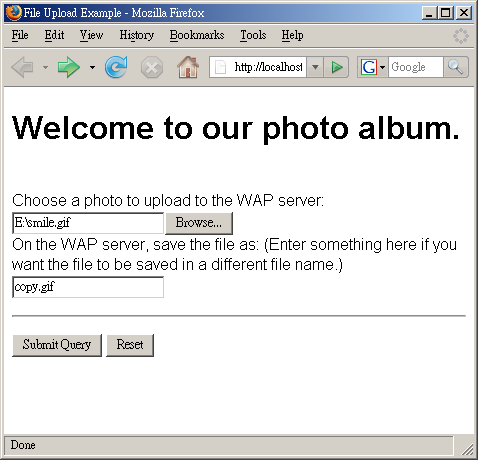
The following example demonstrates how to upload a file from a Nokia 6230 cell phone. Here is the XHTML MP document of the example. As XHTML MP is compatible with HTML/XHTML, this XHTML MP document can also be opened with web browsers such as Microsoft Internet Explorer and Mozilla Firefox.


<?xml version=”1.0″?>
<!DOCTYPE html PUBLIC “-//WAPFORUM//DTD XHTML Mobile 1.0//EN” “http://www.wapforum.org/DTD/xhtml-mobile10.dtd”>

<html xmlns=”http://www.w3.org/1999/xhtml”>
  <head>
    <title>File Upload Example</title>
  </head>

  <body>
    <h1>Welcome to our photo album.</h1>

    <form action=”file_upload.php” method=”post” enctype=”multipart/form-data”>
      <p><br/>
        Choose a photo to upload to the WAP server:
        <input name=”myFile” type=”file”/><br/>
        On the WAP server, save the file as: (Enter something here if you want the file to be saved in a different file name.)
        <input name=”filename” type=”text”/>
      </p>

      <hr/>

      <p>
        <input type=”submit”/>
        <input type=”reset”/>
      </p>
    </form>
  </body>
</html>


The above XHTML MP document enables the user to choose a photo to upload and specify a different name for the file if he/she wants to do so.


If you have read our XHTML MP tutorial, the tags and attributes in the above XHTML MP document should be very familiar to you, with the exception of the enctype attribute of the <form> tag. The enctype attribute is used to specify how the form data should be encoded in the HTTP request when the method attribute value is post. The default value of the enctype attribute is “application/x-www-form-urlencoded”. It has to be changed to “multipart/form-data” to enable file upload.


In most cases, that’s all we need to know about “multipart/form-data” since we will not parse the form data encoded in HTTP requests ourselves but to use functions provided by a server-side technology. Writing the functions by our own is error-prone and is not recommended. If you need to learn the details of the “multipart/form-data” format, please refer to the Form-based File Upload in HTML (RFC 1867) document.


Note that the above XHTML MP document does not conform to the XHTML MP specification since “file” is not a valid value of the type attribute of the <input> tag in standard XHTML MP. Thus, the document cannot pass the check of an XHTML MP validator.


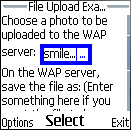
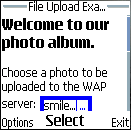
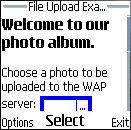
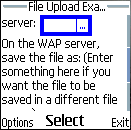
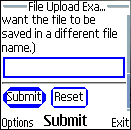
The screenshots below show what you will see on the screen of the Nokia 6230 cell phone:


Nokia 6230


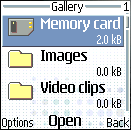
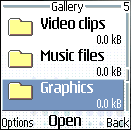
If you click the file select field, you will see something like this:


Nokia 6230


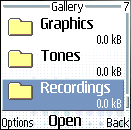
Select the “Memory card” item in the above menu and you will see something like this:


Nokia 6230


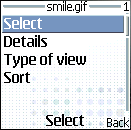
Select the “Options” softkey in the bottom left-hand corner of the screen of the cell phone and you will see:


Nokia 6230


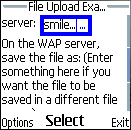
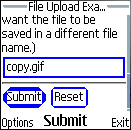
Select the “Select” option. The mobile browser will go back to the first page and the name of the file chosen will be displayed in the file select field, like this:


Nokia 6230


If you click the submit button of the form, the form data will be posted to the WAP server.


Now the only thing left is to write a server-side script to extract the uploaded file from the HTTP request and save it to the local file system or a database.


In the following sections, we will introduce to you how to handle file uploads with PHP and Java Servlet / JSP. If you use a server-side technology other than PHP and Java Servlet / JSP, the code will be different but the idea is the same.

Handling Form-based File Upload with Java Servlet or JSP

Unlike PHP, Java Servlet and JSP do not have build-in mechanisms for handling form-based file uploads. One solution to this problem is to implement a function yourself to extract uploaded files contained in an HTTP request. However, a better choice is to make use of a third-party library that can help us handle file uploads.


One robust library available is the Apache Jakarta Commons FileUpload package. It is open-source and can be downloaded free of charge over the Internet. We will demonstrate how to use the Apache Jakarta Commons FileUpload package to extract uploaded files submitted from a form. The techniques are the same for HTML and XHTML. If you are not familiar with JSP or Java Servlet, you may want to read some introductory tutorials before going through this section.


At the time of writing, the most up-to-date version of the Apache Jakarta Commons FileUpload library is 1.1.1. So, we assume you are using Commons FileUpload 1.1.1 in this tutorial. For other versions of Commons FileUpload, the procedures may be slightly different but the principle is the same.


Downloading the Apache Jakarta Commons FileUpload and Commons IO Libraries


To download the Apache Jakarta Commons FileUpload library, go to the home page of the Apache Jakarta Commons FileUpload project and navigate to the download section. The binaries are available in two file formats: zip format and tar-gzip format. Download either one of them and uncompress the file. Then go to the home page of the Apache Jakarta Commons IO project and repeat the same steps. We need the Commons IO library since Commons FileUpload uses it internally. Now you have two JAR files, “commons-fileupload-version.jar” and “commons-io-version.jar”, where version is the version number. At the time of writing, the latest version of the Commons FileUpload library and that of the Commons IO library are 1.1.1 and 1.2 respectively. So, the JAR files we obtain are “commons-fileupload-1.1.1.jar” and “commons-io-1.2.jar”.


Installing Apache Jakarta Commons FileUpload and Commons IO into a Servlet/JSP Container Like Tomcat


Next, we need to install the Apache Jakarta Commons FileUpload library and the Apache Jakarta Commons IO library into a Servlet/JSP container such as Apache Tomcat. To do this, copy the JAR files “commons-fileupload-1.1.1.jar” and “commons-io-1.2.jar” to the /WEB-INF/lib/ directory in the document root of your web application.


Note that JAR libraries stored in /WEB-INF/lib/ will be available to the containing web application only. If you want to share the libraries among all web applications installed in Tomcat (suppose you are using Tomcat 5 or Tomcat 4), the JAR files should be copied to the $CATALINA_HOME/shared/lib/ directory, where $CATALINA_HOME is the root of your Tomcat installation.


Checking If an HTTP Request is Encoded in Multipart Format


Now that you have installed the Apache Jakarta Commons FileUpload library, you can start writing the code. First, we have to make sure the HTTP request is encoded in multipart format. This can be done using the static method isMultipartContent() of the ServletFileUpload class of the org.apache.commons.fileupload.servlet package:


if (ServletFileUpload.isMultipartContent(request)){
  // Parse the HTTP request…
}


In the above Java code snippet, request is a javax.servlet.http.HttpServletRequest object that encapsulates the HTTP request. It should be very familiar to you if you know Java Servlet or JSP.


Parsing Form Data with Java Servlet / JSP


Second, we will parse the form data contained in the HTTP request. Parsing the form data is very straightforward with the Apache Jakarta Commons FileUpload library:


ServletFileUpload servletFileUpload = new ServletFileUpload(new DiskFileItemFactory());
List fileItemsList = servletFileUpload.parseRequest(request);


(In the above Java code snippet, DiskFileItemFactory is a class contained in the org.apache.commons.fileupload.disk package and List is an interface contained in the java.util package.)


If everything works fine, fileItemsList will contain a list of file items that are instances of FileItem of the org.apache.commons.fileupload package. A file item may contain an uploaded file or a simple name-value pair of a form field. (More details about FileItem will be provided later.)


By default, the ServletFileUpload instance created by the above Java code uses the following values when parsing the HTTP request:


  • Size threshold = 10,240 bytes. If the size of a file item is smaller than the size threshold, it will be stored in the memory. Otherwise it will be stored in a temporary file on disk.


  • Maximum HTTP request body size = -1, which means the server will accept HTTP request bodies of any size.


  • Repository = System default temp directory, whose value can be found by the Java code System.getProperty(“java.io.tmpdir”). Temporary files will be stored there.


If you do not like the default settings, you can change them using the methods setSizeThreshold() and setRespository() of the DiskFileItemFactory class and the setSizeMax() method of the ServletFileUpload class, like this:


DiskFileItemFactory diskFileItemFactory = new DiskFileItemFactory();
diskFileItemFactory.setSizeThreshold(40960); /* the unit is bytes */

File repositoryPath = new File(“/temp”);
diskFileItemFactory.setRepository(repositoryPath);

ServletFileUpload servletFileUpload = new ServletFileUpload(diskFileItemFactory);
servletFileUpload.setSizeMax(81920); /* the unit is bytes */


(In the above Java code snippet, File is a class of the java.io package.)


If the size of the HTTP request body exceeds the maximum you set, the SizeLimitExceededException exception (fully qualified name: org.apache.commons.fileupload.FileUploadBase.SizeLimitExceededException) will be thrown when you call the parseRequest() method:


try {
  List fileItemsList = servletFileUpload.parseRequest(request);
  /* Process file items… */
}
catch (SizeLimitExceededException ex) {
  /* The size of the HTTP request body exceeds the limit */
}


Iterating through File Items


Third, we will iterate through the file items and process each of them. The isFormField() method of the FileItem interface is used to determine whether a file item contains a simple name-value pair of a form field or an uploaded file:


Iterator it = fileItemsList.iterator();
while (it.hasNext()){
  FileItem fileItem = (FileItem)it.next();
  if (fileItem.isFormField()){
    /* The file item contains a simple name-value pair of a form field */
  }
  else{
    /* The file item contains an uploaded file */
  }
}


(In the above Java code snippet, Iterator is an interface in the java.util package and FileItem is an interface in the org.apache.commons.fileupload package.)

Example PHP File Upload Script

Below shows a PHP file upload script that is written to handle the form data submitted from the earlier XHTML MP document. The PHP script prints out the information obtained from the HTTP request and saves the uploaded file to the “/file_uploads” directory of the WAP server.


<?php header(`Content-type: application/vnd.wap.xhtml+xml`); ?>
<?php echo `<?xml version=”1.0″?` . `>`; ?>
<!DOCTYPE html PUBLIC “-//WAPFORUM//DTD XHTML Mobile 1.0//EN” “http://www.wapforum.org/DTD/xhtml-mobile10.dtd”>

<html xmlns=”http://www.w3.org/1999/xhtml”>
  <head>
    <title>File Upload Example</title>
  </head>

  <body>
    <h1>Data Received at the Server</h1>
    <hr/>
    <p>

<?php
foreach ($_POST as $key => $value){
?>

<b>Name-value Pair Info:</b><br/>
Field name: <?php echo $key; ?><br/>
Field value: <?php echo $value; ?><br/><br/>

<?php
}

$optionalFileName = $_POST[`filename`];

if ($_FILES[`myFile`][`error`] == UPLOAD_ERR_OK){
  $fileName = $_FILES[`myFile`][`name`];
?>

<b>Uploaded File Info:</b><br/>
Content type: <?php echo $_FILES[`myFile`][`type`]; ?><br/>
Field name: myFile<br/>
File name: <?php echo $fileName; ?><br/>
File size: <?php echo $_FILES[`myFile`][`size`]; ?><br/><br/>

<?php
  /* Save the uploaded file if its size is greater than 0. */
  if ($_FILES[`myFile`][`size`] > 0){
    if ($optionalFileName == “”)
      $fileName = basename($fileName);
    else
      $fileName = $optionalFileName;

    $dirName = `/file_uploads/`;

    if (move_uploaded_file($_FILES[`myFile`][`tmp_name`], $dirName . $fileName)){
?>

<b>The uploaded file has been saved successfully.</b>

<?php
    }
    else{
?>

<b>An error occurred when we tried to save the uploaded file.</b>

<?php
    }
  }
}
?>

    </p>
  </body>
</html>


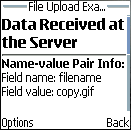
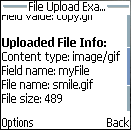
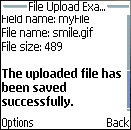
The following screenshots show what you will see on the Nokia 6230 cell phone:


Nokia 6230 cell phone


The above PHP script is very straightforward. Most of the code has been covered before. Below shows some lines of code that you may be unfamiliar with.


The line:


<?php header(`Content-type: application/vnd.wap.xhtml+xml`); ?>


is used to set the MIME type of the PHP document. “application/vnd.wap.xhtml+xml” is the MIME type of XHTML MP.


The line:


<?php echo `<?xml version=”1.0″?` . `>`; ?>


is used to output the XML declaration “<?xml version=”1.0″?>”. We have to output it this way since “<?” and “?>” of the XML declaration are the opening and closing tags of the PHP language. If we include the XML declaration in a PHP document directly, like this:


<?php header(`Content-type: application/vnd.wap.xhtml+xml`); ?>
<?xml version=”1.0″?>
<!DOCTYPE html PUBLIC “-//WAPFORUM//DTD XHTML Mobile 1.0//EN” “http://www.wapforum.org/DTD/xhtml-mobile10.dtd”>


then a parse error will occur.


The line:


$fileName = basename($fileName);


is necessary in the example PHP script since some browsers provide the full path of the uploaded file in the HTTP request, which means $_FILES[`myFile`][`name`] may contain a path but not a file name. Hence, we need to use the PHP function basename() to extract the file name from the path. For example, both basename(`/files/myFile.txt`) and basename(`myFile.txt`) returns the string “myFile.txt”.


As XHTML MP is compatible with HTML/XHTML, the resulting XHTML MP document generated by the PHP script can also be viewed on web browsers such as Microsoft Internet Explorer and Mozilla Firefox. The only thing you need to do is to remove the following line from the PHP script:


<?php header(`Content-type: application/vnd.wap.xhtml+xml`); ?>


This is because unlike WAP 2.0 browsers on cell phones, Internet Explorer 6 and Mozilla Firefox 2.0 do not understand the MIME type of XHTML MP. Instead of displaying the XHTML MP document, they will pop up a dialog box asking you to select a program to open the document or save the document on disk.


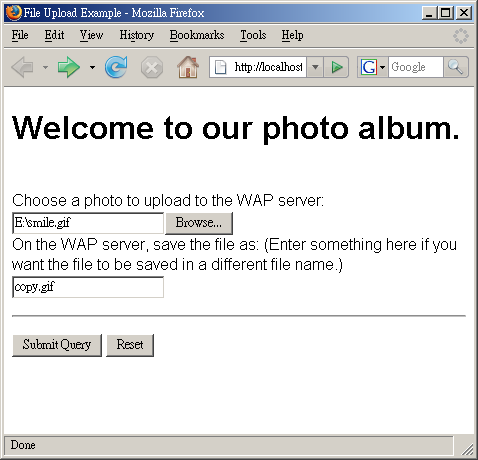
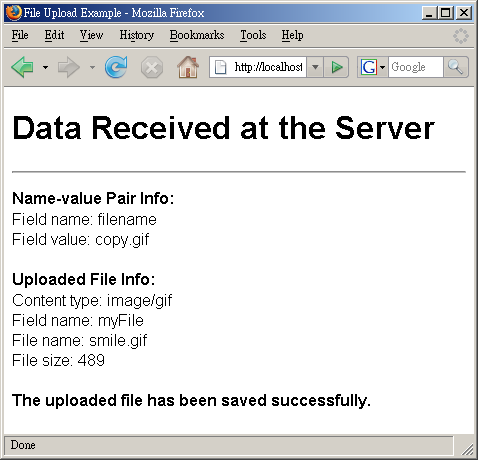
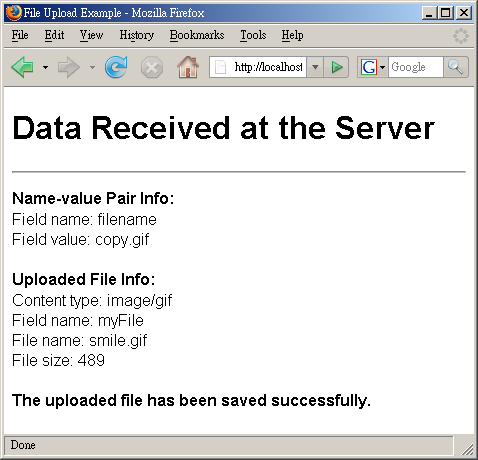
The following screenshots show the result on Mozilla Firefox 2.0:


Mozilla Firefox 2.0


Example JSP File Upload Script

Below shows a JSP file upload script that is used to print out the name-value pair received from the earlier XHTML MP document and save the uploaded file to a certain location on the WAP server. Remember to change the action attribute of the <form> element in the earlier XHTML MP document from file_upload.php to file_upload.jsp for this example to work.


<?xml version=”1.0″?>
<!DOCTYPE html PUBLIC “-//WAPFORUM//DTD XHTML Mobile 1.0//EN” “http://www.wapforum.org/DTD/xhtml-mobile10.dtd”>

<%@ page import=”org.apache.commons.fileupload.*, org.apache.commons.fileupload.servlet.ServletFileUpload, org.apache.commons.fileupload.disk.DiskFileItemFactory, org.apache.commons.io.FilenameUtils, java.util.*, java.io.File, java.lang.Exception” %>
<% response.setContentType(“application/vnd.wap.xhtml+xml”); %>

<html xmlns=”http://www.w3.org/1999/xhtml”>
  <head>
    <title>File Upload Example</title>
  </head>

  <body>
    <h1>Data Received at the Server</h1>
    <hr/>
    <p>

<%
if (ServletFileUpload.isMultipartContent(request)){
  ServletFileUpload servletFileUpload = new ServletFileUpload(new DiskFileItemFactory());
  List fileItemsList = servletFileUpload.parseRequest(request);

  String optionalFileName = “”;
  FileItem fileItem = null;

  Iterator it = fileItemsList.iterator();
  while (it.hasNext()){
    FileItem fileItemTemp = (FileItem)it.next();
    if (fileItemTemp.isFormField()){
%>

<b>Name-value Pair Info:</b><br/>
Field name: <%= fileItemTemp.getFieldName() %><br/>
Field value: <%= fileItemTemp.getString() %><br/><br/>

<%
      if (fileItemTemp.getFieldName().equals(“filename”))
        optionalFileName = fileItemTemp.getString();
    }
    else
      fileItem = fileItemTemp;
  }

  if (fileItem!=null){
    String fileName = fileItem.getName();
%>

<b>Uploaded File Info:</b><br/>
Content type: <%= fileItem.getContentType() %><br/>
Field name: <%= fileItem.getFieldName() %><br/>
File name: <%= fileName %><br/>
File size: <%= fileItem.getSize() %><br/><br/>

<%
    /* Save the uploaded file if its size is greater than 0. */
    if (fileItem.getSize() > 0){
      if (optionalFileName.trim().equals(“”))
        fileName = FilenameUtils.getName(fileName);
      else
        fileName = optionalFileName;

      String dirName = “/file_uploads/”;

      File saveTo = new File(dirName + fileName);
      try {
        fileItem.write(saveTo);
%>

<b>The uploaded file has been saved successfully.</b>

<%
      }
      catch (Exception e){
%>

<b>An error occurred when we tried to save the uploaded file.</b>

<%
      }
    }
  }
}
%>

    </p>
  </body>
</html>


The following screenshots show what you will see in the Nokia 6230 cell phone:


Nokia 6230 cell phone


The above JSP script is very straightforward. Most of the code has been covered earlier. Below shows some lines of code that you may be unfamiliar with.


The line:


<% response.setContentType(“application/vnd.wap.xhtml+xml”); %>


is used to set the MIME type of the JSP document. “application/vnd.wap.xhtml+xml” is the MIME type of XHTML MP.


The line:


fileName = FilenameUtils.getName(fileName);


is used to extract the file name from a path. (FilenameUtils is a class of the org.apache.commons.io package in the Apache Jakarta Commons IO library.) For example, both FilenameUtils.getName(“/files/myFile.txt”) and FilenameUtils.getName(“myFile.txt”) return the string “myFile.txt”. The above line of code is necessary in our JSP script since some browsers provide the full path of the uploaded file in the HTTP request and so after the execution of the following line, the fileName variable may contain a path but not a file name.


String fileName = fileItem.getName();


As XHTML MP is compatible with HTML/XHTML, the resulting XHTML MP document generated by the JSP script can also be viewed on web browsers such as Microsoft Internet Explorer and Mozilla Firefox. The only thing you need to do is to remove the following line from the JSP script:


<% response.setContentType(“application/vnd.wap.xhtml+xml”); %>


This is because unlike WAP 2.0 browsers on cell phones, Internet Explorer 6 and Mozilla Firefox 2.0 do not understand the MIME type of XHTML MP. Instead of displaying the XHTML MP document, they will pop up a dialog box asking you to select a program to open the document or save the document on disk.


The following screenshots show the result on Mozilla Firefox 2.0:


Mozilla Firefox 2.0

Security Considerations of File Upload

Before enabling HTTP file upload on your server, one important thing that you must consider is security, as improper design and configuration will make your server vulnerable to attacks.


For example, the PHP file upload script and JSP file upload script that were covered earlier are not secure. One problem is that we have not checked what the user entered in the optional filename text box. This gives malicious users the chance to modify the server’s files (e.g. system files or password files). For example, if a malicious user enters a path such as “../password/password.dat” in the optional filename text box, our PHP and JSP script will save the uploaded file to the destination “/file_uploads/../password/password.dat”, which is actually the path “/password/password.dat”.


Here are a few security tips that may be useful to you. We will only provide some brief descriptions here. For more details, please refer to other sources.


  • Check all information provided by the client to ensure that it is safe. For example:


    • The HTTP request received includes a MIME type that describes what the uploaded file contains. A malicious user can provide a wrong value to trick you to think that the uploaded file is of another type. Hence, you should not rely on the MIME type included in the HTTP request but should perform a check by your own at the server-side. For instance, the photo album example covered earlier does not perform any checks to ensure the uploaded files are really image files. To enhance security, we can include a check on the uploaded files using the PHP function getimagesize() at the server-side. If getimagesize() returns false, that means the uploaded file is not a valid image file and it should be rejected.


    • The HTTP request received includes the uploaded file’s original file name at the client-side. A malicious user can provide an unsafe value to trick you to modify system or password files. This problem is similar to the one described in the second paragraph of this section, so we will not describe it once more.
      In addition, you should prepare for the situation that the file name contains special characters that are not allowed to appear in file names or non-English characters. Make sure your WAP/web application will not crash or be left in an erroneous state when such situations occur.


  • Set a file size limit so that the user cannot upload files that are too large or too small.


  • Do not run web servers or application servers with the administrator account. Create and configure an account that is specifically for their use. Limit the file access permissions of the account so that even if your WAP/web application has security holes, the OS will not allow it to work with system files or files of other users.


  • Make sure your WAP/web application does not reveal too much information to the user when an error occurs. The information revealed can help a malicious user find ways to attack your system.


  • Log down the details (such as the time, the client’s IP address and the user name) of file uploads and other related events. Although the logs only tell you what has happened, they can help you check what types of attacks have been made against your server and whether there were any successful attacks.


sitemap.xml.gz Generator use JAVA


sitemap.xml.gz Generator for use with Google ™


Click Here to run it!


Java WebStart Application


You’ll need to install Java if you don’t have it installed already.

click here to run it:

sitemap.xml.gz Generator for use with Google


  • Runs on your desktop computer.
  • Runs on all operating systems. (Linux, Unix, Windows, MacOS)
  • You don’t need to install Python on your web server.
  • Generate all the sitemaps you want, whenever you want.
  • Perfect for sites with dynamic content
  • Ping the GoogleBot (anonymously) without a Gmail account
  • Can create a sitemap of 50,000 links
    (may take a while to spider though)
  • You can save and reopen your project file.

Be sure to select Yes or Always when prompted with the dialog below:


By using this software you indemnify Web Design Pros and the author from all claim for damages of any sort and assume all risks for the use of this software. The author reserves the right to modify the software at any time without notice to the end users.

永久免費使用NOD32殺毒軟件(更新12月19日)

本方法利用官方服務器的後門,不同于以前那種延長試用期的方法,是真正完美的NOD32破解。

既能更新病毒庫,又能更新程序組件!


不需要任何ID、升級外挂等!


0.如果你已經安裝NOD32,不管是什麽版本,都要先卸載,然後重啓!因為只有以下版本能用這個方法,彆的版本都不行!


1.下載NOD32安裝包


http://www.strongd.net/file/200709/nentcsst.exe


2.安裝前斷開網絡!安裝完成後重啓,打開NOD32控制中心,到“更新”頁面,可以看見一個“購買完全版”按鈕,説明現在是試用版。彆急,現在我們來破解他。


3.點設定——服務器——新增——填入:


http://www.nod32.com/nod_upd


新加NOD32中國非官方論壇專用升級服務器


http://u1.chinanod32.com (電信)


http://www.strongd.net/nod32 (本站更新地址)


http://u2.chinanod32.com (網通)[點確定,把它設成默認的更新服務器,再確定,連上網絡。


等到更新完成,你會發現“完全版”按鈕神奇消失了!就變成正版了!


聲明:這種方法不是用代理!不信你在IE裏打開http://www.nod32.com看看!是正宗的官網


Connection reset by peer:jvm_recv in socket


am programming in Jbuilder7 and weblogic 7. I created a jdbc datasource of a postgres database. In the ejb, I lookup the jndi and get connection to execute a query to get some data and return the ArrayList of data. I also created a servlet to lookup the ejb and get the ArrayList. It always work fine after I restart computer that the server is running. But if I leave it 4 or 5 hours, in the server window, it always appear error in the ejb function “executequery” after I lookup the jndi, get connection and createstatement. The error is:

An I/O error occured while reading from backend – Exception: java.net.S
ocketException: Connection reset by peer: JVM_recv in socket input stream read
Stack Trace:

java.net.SocketException: Connection reset by peer: JVM_recv in socket input str
eam read
at java.net.SocketInputStream.socketRead(Native Method)
at java.net.SocketInputStream.read(SocketInputStream.java:85)
at java.io.BufferedInputStream.fill(BufferedInputStream.java:181)
at java.io.BufferedInputStream.read(BufferedInputStream.java:199)
at org.postgresql.PG_Stream.ReceiveChar(PG_Stream.java:141)
at org.postgresql.core.QueryExecutor.execute(QueryExecutor.java:68)
at org.postgresql.Connection.ExecSQL(Connection.java:398)
at org.postgresql.jdbc2.Statement.execute(Statement.java:130)
at org.postgresql.jdbc2.Statement.executeQuery(Statement.java:54)
at weblogic.jdbc.pool.Statement.executeQuery(Statement.java:863)
at weblogic.jdbc.rmi.internal.StatementImpl.executeQuery(StatementImpl.j
ava:81)
at weblogic.jdbc.rmi.SerialStatement.executeQuery(SerialStatement.java:8
3)
at com.panda.ejb.categorydatamanager.CategoryBean.GetCategory(CategoryBe
an.java:88)
at com.panda.ejb.categorydatamanager.CategoryBean_9ra2ge_EOImpl.GetCateg
ory(CategoryBean_9ra2ge_EOImpl.java:201)
at com.panda.ejb.categorydatamanager.CategoryBean_9ra2ge_EOImpl_WLSkel.i
nvoke(Unknown Source)

Please help me. I have not any ideas about it. Thanks.


RE:Connection reset by peer:jvm_recv in socket


Hi!

Do you have a firewall in the network between the application and database server? Maybe this error is due to the closing of the connection by the firewall (timeout after inactivation).

I am having the same problem, but it had never happened before after 3 years of production use of a connection pooling framework. In fact, the database and application servers are separated by the Internet…

I am trying to find a way to check for a link-failure event in Java.

You should also watch topic “ORACLE driver: timeout => Connection reset by peer: socket write error ?”


RE:

from http://java.sun.com/features/2002/08/j2se-network.html

Connection Reset by Peer :

One of the issues that developers frequently run into is the Connection reset by peer exception:

Exception in thread “main” java.net.SocketException:
Connection reset by peer: JVM_recv in socket input stream read.

This basically means that a network error occurred while the client was receiving data from the server. But what is really happening is that the server actually accepts the connection, processes the request, and sends a reply to the client. However, when the server closes the socket, the client believes that the connection has been terminated abnormally because the socket implementation sends a TCP reset segment telling the client to throw away the data and report an error.

Sometimes, this problem is caused by not properly closing the input/output streams and the socket connection. Make sure you close the input/output streams and socket connection properly. If everything is closed properly, however, and the problem persists, you can work around it by adding Thread.sleep(1000) before closing the streams and the socket. This technique, however, is not reliable and may not work on all systems.


RE:


Try to have a look at this similar topic, expecially at answer 1.
http://forum.java.sun.com/thread.jsp?forum=48&thread=424393

Bye