( ! ) Deprecated: Function WP_Dependencies-&gt;add_data() was called with an argument that is <strong>deprecated</strong> since version 6.9.0! IE conditional comments are ignored by all supported browsers. in /var/www/html/wp-includes/functions.php on line 6131
Call Stack
#TimeMemoryFunctionLocation
10.0000484224{main}( ).../index.php:0
20.0004484576require( '/var/www/html/wp-blog-header.php ).../index.php:17
30.09634371424require_once( '/var/www/html/wp-includes/template-loader.php ).../wp-blog-header.php:19
40.10114400744include( '/var/www/html/wp-content/themes/twentyfifteen/archive.php ).../template-loader.php:125
50.10114400744get_header( $name = ???, $args = ??? ).../archive.php:19
60.10114400960locate_template( $template_names = [0 => 'header.php'], $load = TRUE, $load_once = TRUE, $args = [] ).../general-template.php:48
70.10114401056load_template( $_template_file = '/var/www/html/wp-content/themes/twentyfifteen/header.php', $load_once = TRUE, $args = [] ).../template.php:749
80.10154401600require_once( '/var/www/html/wp-content/themes/twentyfifteen/header.php ).../template.php:814
90.10164409008wp_head( ).../header.php:18
100.10164409008do_action( $hook_name = 'wp_head' ).../general-template.php:3197
110.10164409224WP_Hook->do_action( $args = [0 => ''] ).../plugin.php:522
120.10164409224WP_Hook->apply_filters( $value = '', $args = [0 => ''] ).../class-wp-hook.php:365
130.10184530992wp_enqueue_scripts( '' ).../class-wp-hook.php:341
140.10184530992do_action( $hook_name = 'wp_enqueue_scripts' ).../script-loader.php:2311
150.10184531208WP_Hook->do_action( $args = [0 => ''] ).../plugin.php:522
160.10184531208WP_Hook->apply_filters( $value = '', $args = [0 => ''] ).../class-wp-hook.php:365
170.10194538728twentyfifteen_scripts( '' ).../class-wp-hook.php:341
180.10204540248wp_style_add_data( $handle = 'twentyfifteen-ie', $key = 'conditional', $value = 'lt IE 9' ).../functions.php:440
190.10204540248WP_Styles->add_data( $handle = 'twentyfifteen-ie', $key = 'conditional', $value = 'lt IE 9' ).../functions.wp-styles.php:245
200.10204540248WP_Dependencies->add_data( $handle = 'twentyfifteen-ie', $key = 'conditional', $value = 'lt IE 9' ).../class-wp-styles.php:385
210.10204540248_deprecated_argument( $function_name = 'WP_Dependencies->add_data()', $version = '6.9.0', $message = 'IE conditional comments are ignored by all supported browsers.' ).../class-wp-dependencies.php:317
220.10214540568wp_trigger_error( $function_name = '', $message = 'Function WP_Dependencies->add_data() was called with an argument that is <strong>deprecated</strong> since version 6.9.0! IE conditional comments are ignored by all supported browsers.', $error_level = 16384 ).../functions.php:5925
230.10214541320trigger_error( $message = 'Function WP_Dependencies-&gt;add_data() was called with an argument that is <strong>deprecated</strong> since version 6.9.0! IE conditional comments are ignored by all supported browsers.', $error_level = 16384 ).../functions.php:6131

( ! ) Deprecated: Function WP_Dependencies-&gt;add_data() was called with an argument that is <strong>deprecated</strong> since version 6.9.0! IE conditional comments are ignored by all supported browsers. in /var/www/html/wp-includes/functions.php on line 6131
Call Stack
#TimeMemoryFunctionLocation
10.0000484224{main}( ).../index.php:0
20.0004484576require( '/var/www/html/wp-blog-header.php ).../index.php:17
30.09634371424require_once( '/var/www/html/wp-includes/template-loader.php ).../wp-blog-header.php:19
40.10114400744include( '/var/www/html/wp-content/themes/twentyfifteen/archive.php ).../template-loader.php:125
50.10114400744get_header( $name = ???, $args = ??? ).../archive.php:19
60.10114400960locate_template( $template_names = [0 => 'header.php'], $load = TRUE, $load_once = TRUE, $args = [] ).../general-template.php:48
70.10114401056load_template( $_template_file = '/var/www/html/wp-content/themes/twentyfifteen/header.php', $load_once = TRUE, $args = [] ).../template.php:749
80.10154401600require_once( '/var/www/html/wp-content/themes/twentyfifteen/header.php ).../template.php:814
90.10164409008wp_head( ).../header.php:18
100.10164409008do_action( $hook_name = 'wp_head' ).../general-template.php:3197
110.10164409224WP_Hook->do_action( $args = [0 => ''] ).../plugin.php:522
120.10164409224WP_Hook->apply_filters( $value = '', $args = [0 => ''] ).../class-wp-hook.php:365
130.10184530992wp_enqueue_scripts( '' ).../class-wp-hook.php:341
140.10184530992do_action( $hook_name = 'wp_enqueue_scripts' ).../script-loader.php:2311
150.10184531208WP_Hook->do_action( $args = [0 => ''] ).../plugin.php:522
160.10184531208WP_Hook->apply_filters( $value = '', $args = [0 => ''] ).../class-wp-hook.php:365
170.10194538728twentyfifteen_scripts( '' ).../class-wp-hook.php:341
180.13794542424wp_style_add_data( $handle = 'twentyfifteen-ie7', $key = 'conditional', $value = 'lt IE 8' ).../functions.php:444
190.13794542424WP_Styles->add_data( $handle = 'twentyfifteen-ie7', $key = 'conditional', $value = 'lt IE 8' ).../functions.wp-styles.php:245
200.13794542424WP_Dependencies->add_data( $handle = 'twentyfifteen-ie7', $key = 'conditional', $value = 'lt IE 8' ).../class-wp-styles.php:385
210.13794542424_deprecated_argument( $function_name = 'WP_Dependencies->add_data()', $version = '6.9.0', $message = 'IE conditional comments are ignored by all supported browsers.' ).../class-wp-dependencies.php:317
220.13794542744wp_trigger_error( $function_name = '', $message = 'Function WP_Dependencies->add_data() was called with an argument that is <strong>deprecated</strong> since version 6.9.0! IE conditional comments are ignored by all supported browsers.', $error_level = 16384 ).../functions.php:5925
230.13804542968trigger_error( $message = 'Function WP_Dependencies-&gt;add_data() was called with an argument that is <strong>deprecated</strong> since version 6.9.0! IE conditional comments are ignored by all supported browsers.', $error_level = 16384 ).../functions.php:6131

Writing Hibernate Configuration Files

In the previous section we completed the database setup and created required table and populated with the data. In this section we will write required hibernate configuration files.


For this tutorial we need following Hibernate configuration files:


Hibernate Configuration File


Hibernate configuration file (hibernate.cfg.xml) is used to provide the information which is necessary for making database connections. The mapping details for mapping the domain objects to the database tables are also a part of Hibernate configuration file. 


Here is the code of our Hibernate Configuration File:


<?xml version=’1.0′ encoding=’utf-8′?>
<!DOCTYPE hibernate-configuration PUBLIC
“-//Hibernate/Hibernate Configuration DTD//EN”
“http://hibernate.sourceforge.net/hibernate-configuration-3.0.dtd”>

<hibernate-configuration>
<session-factory>
<property name=”hibernate.connection.driver_class”>com.mysql.jdbc.Driver</property>
<property name=”hibernate.connection.url”>jdbc:mysql://localhost/struts-hibernate</property>
<property name=”hibernate.connection.username”>root</property>
<property name=”hibernate.connection.password”></property>
<property name=”hibernate.connection.pool_size”>10</property>
<property name=”show_sql”>true</property>
<property name=”dialect”>org.hibernate.dialect.MySQLDialect</property>
<property name=”hibernate.hbm2ddl.auto”>update</property>
<!– Mapping files –>
<mapping resource=”/roseindia/net/dao/hibernate/Tutorial.hbm.xml”/>
</session-factory>
</hibernate-configuration> 


Place hibernate.cfg.xml file in the source directory e.g. “C:\Struts-Hibernate-Integration\code\src\java”


The <mapping resource=”> tag is used to specify the mapping file:


<mapping resource=”/roseindia/net/dao/hibernate/Tutorial.hbm.xml”/>


Code of Tutorial.hbm.xml:


 <?xml version=”1.0″ encoding=”UTF-8″?>
<!DOCTYPE hibernate-mapping PUBLIC “-//Hibernate/Hibernate Mapping DTD//EN”
“http://hibernate.sourceforge.net/hibernate-mapping-3.0.dtd”>

<hibernate-mapping auto-import=”true” default-lazy=”false”>

<class 
name=”roseindia.net.dao.hibernate.Tutorial” 
table=”tutorials”
>

<id
name=”id”
type=”java.lang.Integer”
column=”id”
>
<generator class=”increment” />
</id>

<property
name=”shortdesc”
type=”java.lang.String”
column=”shortdesc”
not-null=”true”
length=”50″
/>
<property
name=”longdesc”
type=”java.lang.String”
column=”longdesc”
not-null=”true”
length=”250″
/>
<property
name=”pageurl”
type=”java.lang.String”
column=”pageurl”
not-null=”true”
length=”100″
/>


</class>
</hibernate-mapping>

Place Tutorial.hbm.xml file in the source directory e.g. “C:\Struts-Hibernate-Integration\code\src\java\roseindia\net\dao\hibernate\” 


POJO Object
Here is the code of Java Bean object (Tutorial.java) used to store and retrieve the data from database.


package roseindia.net.dao.hibernate;

import java.io.Serializable;


public class Tutorial implements Serializable {

    /** identifier field */
    private Integer id;

    /** persistent field */
    private String shortdesc;

    /** persistent field */
    private String longdesc;

    /** persistent field */
    private String pageurl;

    /** full constructor */
    public Tutorial(Integer id, String shortdesc, String longdesc, String pageurl) {
        this.id = id;
        this.shortdesc = shortdesc;
        this.longdesc = longdesc;
        this.pageurl = pageurl;
    }

    /** default constructor */
    public Tutorial() {
    }

    public Integer getId() {
        return this.id;
    }

    public void setId(Integer id) {
        this.id = id;
    }

    public String getShortdesc() {
        return this.shortdesc;
    }

    public void setShortdesc(String shortdesc) {
        this.shortdesc = shortdesc;
    }

    public String getLongdesc() {
        return this.longdesc;
    }

    public void setLongdesc(String longdesc) {
        this.longdesc = longdesc;
    }

    public String getPageurl() {
        return this.pageurl;
    }

    public void setPageurl(String pageurl) {
        this.pageurl = pageurl;
    }

}

In this section we have created all the Hibernate related stuffs.


Developing Struts Hibernate Plugin

In this section we will develop java code for Struts Hibernate Plugin. Our Hibernate Plugin will create Hibernate Session factory and cache it in the servlet context. This strategy enhances the performance of the application.


Source Code Of Hibernate Struts Plugin:


package roseindia.net.plugin;

import java.net.URL;
import javax.servlet.ServletContext;
import javax.servlet.ServletException;
import org.hibernate.SessionFactory;
import org.hibernate.cfg.Configuration;
import org.apache.commons.logging.Log;
import org.apache.commons.logging.LogFactory;
import org.apache.struts.action.ActionServlet;
import org.apache.struts.action.PlugIn;
import org.apache.struts.config.ModuleConfig;
import org.hibernate.HibernateException;


public class HibernatePlugIn implements PlugIn {
   private String _configFilePath = “/hibernate.cfg.xml”;

    /**
     * the key under which the <code>SessionFactory</code> instance is stored
     * in the <code>ServletContext</code>.
     */
    public static final String SESSION_FACTORY_KEY 
            = SessionFactory.class.getName();

  private SessionFactory _factory = null;

   public void destroy() {
     try{
       _factory.close();
     }catch(HibernateException e){
      System.out.println(“Unable to close Hibernate Session Factory: ” + e.getMessage());
     }
       
   }

   public void init(ActionServlet servlet, ModuleConfig configthrows ServletException {
     System.out.println(“*************************************”);
   System.out.println(“**** Initilizing HibernatePlugIn   **********”);
        Configuration configuration = null;
        URL configFileURL = null;
        ServletContext context = null;

   try{
            configFileURL = HibernatePlugIn.class.getResource(_configFilePath);
            context = servlet.getServletContext();
            configuration = (new Configuration()).configure(configFileURL);
            _factory = configuration.buildSessionFactory();
      //Set the factory into session
      context.setAttribute(SESSION_FACTORY_KEY, _factory);

   }catch(HibernateException e){
    System.out.println(“Error while initializing hibernate: ” + e.getMessage());
   }
   System.out.println(“*************************************”);

   }

    /**
     * Setter for property configFilePath.
     @param configFilePath New value of property configFilePath.
     */
    public void setConfigFilePath(String configFilePath) {
        if ((configFilePath == null|| (configFilePath.trim().length() == 0)) {
            throw new IllegalArgumentException(
                    “configFilePath cannot be blank or null.”);
        }
        
        System.out.println(“Setting ‘configFilePath’ to ‘”  + configFilePath + “‘…”);
        _configFilePath = configFilePath;
    }


/*(SessionFactory) servletContext.getAttribute
(HibernatePlugIn.SESSION_FACTORY_KEY);
*/
  
}


In our plugin class we have define a variable _configFilePath to hold the name of Hibernate Configuration file.


private String _configFilePath = “/hibernate.cfg.xml”;


Following code define the key to store the session factory instance in the Servlet context.


public static final String SESSION_FACTORY_KEY = SessionFactory.class.getName();


The init() is called on the startup of the Struts Application. On startup the session factory is initialized and cached in the Servlet context.


configFileURL = HibernatePlugIn.class.getResource(_configFilePath);
context = servlet.getServletContext();
configuration = (new Configuration()).configure(configFileURL);
_factory = configuration.buildSessionFactory();
//Set the factory into session
context.setAttribute(SESSION_FACTORY_KEY, _factory);


Changes to be done in struts-config.xml file


Configuring Hibernate with Struts is very simple work it requires you to have hibernate.cfg.xml in your WEB-INF/classes directory, and to add the following line to the struts-config.xml file.


<plug-in className=”roseindia.net.plugin.HibernatePlugIn”></plug-in>


Testing the Plugin


Build your application and deploy on the tomcat server. Start tomcat server and observe the console output. It should display the following line:


 log4j:WARN Please initialize the log4j system properly.
*************************************
**** Initilizing HibernatePlugIn **********
*************************************
Aug 7, 2006 10:09:53 AM org.apache.struts.tiles.TilesPlugin initD
  

This means you have successfully configured your Struts Hibernate Plugin with struts application.


Developing Struts Web Module

In this we will be creating search interface for enabling the user to search tutorials. This example is an client to test our Struts Hibernate Plugin.


The web component of the application consists of the following files:


1. Search Tutorial Form (SearchTutorial.jsp):


This file is used to display the search form to the user. Here is the code of search form:


<%@ taglib uri=”/tags/struts-bean” prefix=”bean” %>

<%@ taglib uri=”/tags/struts-html” prefix=”html” %>
<html:html locale=”true”>
<head>
<title><bean:message key=”welcome.title”/></title>
<html:base/>
</head>
<body bgcolor=”white”>

<html:form action=”/searchTutorial”>

<html:errors/>

<table>

<tr>
<td align=”right”>
Search Tutorial
</td>
<td align=”left”>
<html:text property=”keyword” size=”30″ maxlength=”30″/>
</td>
</tr> 
<tr>
<td align=”right”>
<html:submit>Search</html:submit>
</td>
</tr>
</table>
</html:form>
</body>
</html:html>


Save SearchTutorial.jsp in to “C:\Struts-Hibernate-Integration\code\pages” directory.


2. Search Result Page (SearchResultPage.jsp)
This page is used to display the search result. Here is the code of search result page:


        <%@page language=”java” import=”java.util.*”%>
<%@ taglib uri=”/tags/struts-bean” prefix=”bean” %>
<%@ taglib uri=”/tags/struts-html” prefix=”html” %>
<p><font size=”4″ color=”#800000″ face=”Arial”>Search Results</font></p>

<%
List searchresult = (List) request.getAttribute(“searchresult”);
%>
<%
for (Iterator itr=searchresult.iterator(); itr.hasNext(); )
{
roseindia.net.dao.hibernate.Tutorial tutorial =
(roseindia.net.dao.hibernate.Tutorial)itr.next();
%>
<p><a href=”<%=tutorial.getPageurl()%>”>
<font face=”Arial” size=”3″><%=tutorial.getShortdesc()%></font></a><br>
<font face=”Arial” size=”2″><%=tutorial.getLongdesc()%></font></p>

<%
}
%>
<html:link page=”/pages/SearchTutorial.jsp”>Back to Search Page</html:link>


Save SearchResultPage.jsp in to “C:\Struts-Hibernate-Integration\code\pages” directory.


3. Search Java Form (SearchTutorialActionForm.java)
This is the Struts action form class. Here is the code of the Action Form:


package roseindia.web;

import javax.servlet.http.HttpServletRequest;

import org.apache.struts.action.*;

public class SearchTutorialActionForm extends ActionForm
{
  private String keyword=null;

public void setKeyword(String keyword){
    this.keyword=keyword;
  }

  public String getKeyword(){
    return this.keyword;
  }

   public void reset(ActionMapping mapping, HttpServletRequest request) {
    this.keyword=null;
    }
   public ActionErrors validate
      ActionMapping mapping, HttpServletRequest request ) {
      ActionErrors errors = new ActionErrors();
      
      ifgetKeyword() == null || getKeyword().length() ) {
        errors.add(“keyword”,new ActionMessage(“error.keyword.required”));
     }

      return errors;
  }

}

 4. Search Action Class (SearchTutorialAction.java)


This is Struts Action Class of our application. Here is the code of the Action Class:


package roseindia.web;

import javax.servlet.http.HttpServletRequest;
import javax.servlet.http.HttpServletResponse;
import javax.servlet.ServletContext;

import java.util.List;

import org.apache.struts.action.Action;
import org.apache.struts.action.ActionForm;
import org.apache.struts.action.ActionForward;
import org.apache.struts.action.ActionMapping;

import roseindia.net.plugin.HibernatePlugIn;

import roseindia.net.dao.hibernate.Tutorial;

import org.hibernate.SessionFactory;
import org.hibernate.Session;
import org.hibernate.criterion.Restrictions;
import org.hibernate.Criteria;


public class SearchTutorialAction extends Action
{
  public ActionForward execute(
    ActionMapping mapping,
    ActionForm form,
    HttpServletRequest request,
    HttpServletResponse responsethrows Exception{
  SearchTutorialActionForm formObj = (SearchTutorialActionForm)form;

   System.out.println(“Getting session factory”);
   /*Get the servlet context */
   ServletContext context = request.getSession().getServletContext();
   /*Retrieve Session Factory */
   SessionFactory _factory = (SessionFactory)  
   context.getAttribute
(HibernatePlugIn.SESSION_FACTORY_KEY);
   /*Open Hibernate Session */
   Session  session = _factory.openSession();
     //Criteria Query Example
     Criteria crit = session.createCriteria(Tutorial.class);
     crit.add(Restrictions.like(“shortdesc”“%” + formObj.getKeyword() +“%”))//Like condition

   //Fetch the result from database
   List tutorials= crit.list();
   request.setAttribute(“searchresult”,tutorials);
   
    /*Close session */
      session.close();
    System.out.println(“Hibernate Session Closed”);
      return mapping.findForward(“success”);
  }
}

5. Entries into struts-config.xml


Add the following lines into your struts-config.xml file.


Form Bean: 
<form-bean
name=”TutorialSearch”
type=”roseindia.web.SearchTutorialActionForm”>
</form-bean>


Action Entry:
<action
path=”/searchTutorial”
type=”roseindia.web.SearchTutorialAction”
name=”TutorialSearch”
scope=”request”
validate=”true”
input=”/pages/SearchTutorial.jsp”>
<forward name=”success” path=”/pages/SearchResultPage.jsp”/>
</action>


Now we have created all the required stuffs for the web client. In the next section we will test our application.


Developing Struts Web Module

In this section we will build and test our Struts Hibernate Integration application.


Compiling and packaging application


Since we are using ant build tool, so the compiling and packaging will done by ant tool. To compile and create war file for deployment, open console and go to “C:\Struts-Hibernate-Integration\code\WEB-INF\src” directory. Then just type ant, ant will create strutshibernate.war in the “C:\Struts-Hibernate-Integration\dist” directory.


Deploying and testing application


Copy strutshibernate.war  to the webapps directory of tomcat and start tomcat server. Now open the browser and type http://localhost:8080/strutshibernate/ in the browser. You browser should look like:


Now click on “Click here to test Search Tutorials” link.


Enter some search term say “java” and click on search button. You browser should display the search result as shown below.


Congratulations now you have successfully integrated your struts application with hibernate using Hibernate Struts Plugin.


You can download the code of this application from here.


Extract from Abstract Syntax Notation One (ASN.1)

E.1 What is ASN.1?

ASN.1 is the acronym for Abstract Syntax Notation One, a language for describing structured information; typically, information intended to be conveyed across some interface or communication medium. ASN.1 has been standardised internationally. It is widely used in the specification of communication protocols.

Prior to ASN.1, information to be conveyed in communication protocols was typically specified by ascribing meanings to particular bits and bytes in protocol messages, much as programmers, before the advent of high level languages, had to deal with the bits and bytes of storage layout.

With ASN.1, the protocol designer can view and describe the relevant information and its structure at a high level and need not be unduly concerned with how it is represented while in transit .Compilers can provide run-time code to convert an instance of user or protocol information to bits on the line.

ASN.1 comes into its own when the information being described is complex. This is because the language allows arbitrarily complex structures to be built up in a uniform way from simpler components, and ultimately from a few simple information types. ASN.1 is, in effect, a data definition language, allowing a designer to define the parameters in a protocol data unit without concern as to how they are encoded for transmission. He merely states a need for an Integer followed by text, followed by a floating point number, etc. They can be named and tagged such that two integers can be differentiated as meaning “filesize” or “record number”, for example.
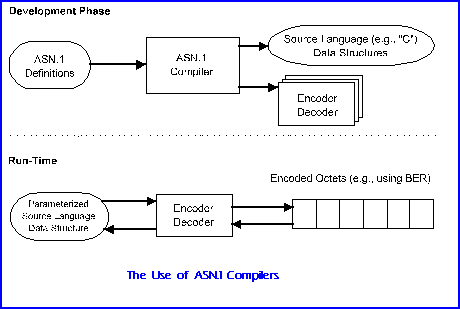

Given any ASN.1 description of a message, a representation can be derived mechanically by applying a set of encoding rules. While many such sets could be imagined, initially only a single set, the Basic Encoding Rules (BER), were standardised as a companion standard to ASN.1 itself. Subsequently two subsets of the basic rules have been approved. These are the Canonical and the Distinguished Encoding Rules. These are exact subsets of the BER, but where it has choices the subsets restrict these to a single possible encoding. In addition, a completely new set of encoding rules has been devised in response to the criticism that BER is highly inefficient, e.g., three bytes to encode a boolean. These are called the packed encoding rules

The “One” was added to the ASN name by ISO to leave open the future possibility of a better language for expressing abstract syntaxes. However, an “ASN.2”, should it ever be considered necessary, will have to be significantly more powerful than ASN.1 to be worth inventing.

E.1.1 Abstract Syntax

To illustrate the concept of abstract syntax consider, for example, ameteorological station, which reports on the prevailing atmospheric conditions to a monitoring centre. At the monitoring centre, the information is input to a weather forecasting program.

With abstract syntax the concern is solely with the information conveyed between the application program running in the computer at the weather station and the application program running in the computer at the monitoring centre.

For different reasons, both programs need to “know” what information is included in a report. The application in the weather station needs to know so that it can create reports from the appropriate sensor readings. The application in the centre needs to know because it must be able to analyse reports and make weather forecasts.

This knowledge, which is essential for the programs to be written, is that of the abstractsyntax; the set of all possible (distinct) reports. The designer of the abstract syntax also defines the meaning of each possible report, and this allows the developers of the programs at each end to implement the appropriate actions.

It would be very unusual for a designer to define the abstract syntax of a message type by explicitly listing all possible messages. This is because any realistic message type will allow an infinite number of distinct possibilities, integer as a simple example of this. Instead, the abstract syntax will generally be structured. The set of possible messages and their meanings can then be inferred from knowledge of the possibilities for each of the components of the structure.

ASN.1 notation is recognisable as a high level definition language. It is constructed in modules with unique identifiers. There are over 20 built data types such as:


Simple data types Character strings Useful Types
BOOLEAN  NumericString  GeneralizedTime
INTEGER  PrintableString  UTCTime
ENUMERATED  TeletexString  EXTERNAL 
REAL  IA5String ObjectDescriptor
BIT STRING GraphicString
OCTET STRING GeneralString
NULL
Arbitrarily complex structures can be built up from these data types using constructors such as:

  • SET{} – order not significant
  • SEQUENCE{} – fixed order
and other useful modifiers such as: OPTIONAL and IMPLICIT

Using ASN.1, the weather report abstract syntax could be expressed as follows:

 WeatherReport                  
::=SEQUENCE {      stationNumber             
INTEGER (1..99999),      timeOfReport              
UTCTime      pressure                  
INTEGER (850..1100)      temperature               
INTEGER (-100..60)      humidity                  
INTEGER (0..100)      windVelocity              
INTEGER (0..500)      windDirection             
INTEGER (0..48) }
A simple protocol data unit might take the form
File-Open-Request
::=SEQUENCE {       filename         
[0]  INTEGER       password         
[1]  Password         OPTIONAL      
mode             
BITSTRING            
{read o,                                              
write 1′                                              
delete 2} Password ::=CHOICE {OCTETSTRING, PrintableString}

E.1.2 Transfer Syntax

Earlier standards such as ASCII and EBCDIC specified both the abstract syntax (the letter A) and the encoding, or transfer syntax, (hexadecimal 21 or 41). ASN.1 separates these two concepts, such that at connect time you can chose to encode the data. Youcan chose an encoding which is efficient on the line or reliable or easy to decode. The first defined for ASN.1 was the Basic Encoding Rules (BER)

The BER allow the automatic derivation of a transfer syntax for every abstract syntax defined using ASN.1. Transfer syntaxes produced by application of the BER can be used over any communications medium which allows the transfer of strings of octets. The encoding rules approach to transfer syntax definition results in considerable saving of effort for application protocol designers. This is particularly pronounced where the messages involved are complex. Perhaps even more important than the savings to the designers are the potential savings to implementors, through the ability to develop general-purpose run-time support. Thus, for example, encoding and decoding subroutines can be developed once and then used in a wide range of applications.

A set of encoding rule can only be developed in the context of an agreed set ofconcepts such as those provided by ASN.1. For example, the concepts required in designing the weather report abstract syntax included the ability to create a message from a sequence of fields, and the concepts of integer and whole number (restricted to certain ranges).

As the structure of ASN.1 is hierarchical, the basic encoding rules follow this structure. They operate on a Tag, Length Value (TLV) scheme. This is actually known in ASN.1 as Identifier, Length, Contents. (ILC). The structure is therefore recursive such that the contents can be a series of ILCs. This bottoms out with genuine contents such as a text string or an integer.

E.2 Basics of ASN.1


E.2.1 Types and Values

The fundamental concepts of ASN.1 are the inter-related notions of type and value. A type is a (non-empty) set of values, and represents a potential for conveying information. Only values are actually conveyed, but their type governs the domain of possibilities. It is by selecting one particular value of the type, rather than the others, that the sender of a message conveys information. The type may have only a

few values, and therefore be capable of conveying only a few distinctions. An example of such a type is Boolean, which has only the two values true and false, with nothing in between. On the other hand, some types, such as Integer and Real, have an infinite number of values and can thus express arbitrarily fine distinctions.

An abstract syntax can be defined as a type, normally a structured type. Its values are precisely the set of valid messages under that abstract syntax. Should the messages be structured, as they commonly are, into fields, then the various fields themselves are defined as types. The values of such a type, in turn, are the set of permitted contents of that field.

A type is a subtype of another, its parent (type), if its values are a subset of those of the parent. Thus, for example, a type “whole number”” whose values are the non-negative integers, could be defined as a subtype of Integer. (ASN.1 does not provide such a type, but one could be defined by the user if needed). Another example would be to define the YEAR as the twelve months and the subtype SPRING as March, April and May.

A type may be simple or structured. The simple types are the basic building blocks of ASN.1, and include types like Boolean and integer. A simple type will generally be used to describe a single aspect of something. A structured type, on the other hand, is defined in terms of other types – its components – and its values are made up of values of the component types. Each of these components may itself be simple or structured, and this nesting can proceed to an arbitrary depth, to suite the needs of the application. All structured types are ultimately defined in terms of simple types.

ASN.1 makes available to the abstract syntax designer a number of simple types, as well as techniques for defining structured types and subtypes. The designer employs these types by using the type notation which ASN.1 provides for each such type. ASN.1 also provides value notation which allows arbitrary values of these types to be written down.

Any type ( or indeed value) which can be written down can be given a name by which it can be referenced. This allows users to define and name types and values that are useful within some enterprise or sphere of interest. These defined types (or defined values) can than be made available for use by others. The defined types within some enterprise can be seen as supplementing the built-in types – those provided directly by ASN.1. ASN.1 also provides a small number of useful types, types which have been defined in terms of the built-in types but which are potentially of use across a wide range of enterprises.

A type is defined by means of a type assignment, and a value is defined by a value assignment. A type assignment has three syntactic components: the type reference (the name being allocated to the new type); the symbol “::=”, which can be read as “is defined as”; and the appropriate type notation. For example:

 WeatherReport ::=SEQUENCE {     
stationNumber             
INTEGER (1..99999),      timeOfReport              
UTCTime      pressure                  
INTEGER (850..1100)      temperature               
INTEGER (-100..60)      humidity                  
INTEGER (0..100)      windVelocity              
INTEGER (0..500)      windDirection             
INTEGER (0..48) }
defines a type called WeatherReport. Everything following the “::=” constitutes valid type notation (for a structured type which comprises a sequence of simple and structured types).

A value assignment is similar, but has an additional syntactic component: the type to which the value belongs. This appears between the value reference (the name being allocated to the value), and the “::=”. For example:

 sampleReport WeatherReport::=SEQUENCE {     
stationNumber             
73290      timeOfReport              
“900102125703Z”,      pressure                  
1056,      temperature               
-3,      humidity                  
26,      windVelocity              
15,      windDirection             
0 }
defines a value of type WeatherReport called sampleReport. The characters after the “::=” constitute valid notation for a value of WeatherReport.

The definition of types and values is almost the only thing that ASN.1 users do. Of these two, the definition of types predominates. This is because an abstract syntax itself is a type, as are its components, and their components, and so on. In a specification, it is the types, the sets of possible values, which are most significant. Individual values only appear as examples and defaults. Consider how much more useful in a specification is the type INTEGER than the particular value 314 (or any other integer value for that matter). Conversely, in instances of communication it is values which are significant.

E.2.2 Subtypes

Frequently the designer intends only some subset of the values of an ASN.1 type to be valid in some situation. For instance, in conveying a measure of humidity as a percentage, only numbers in the range 0 to 100 are valid, or when conveying a postal code only strings with certain characters and whose length falls within a certain range are to be permitted. Perhaps when some protocol message is used in a certain context, the optional checksum field is to be absent.

These are all examples of constraints which can be expressed by defining a subtype of a suitable parent type. This is done by appending to the notation for the parent a suitable subtype specification. The result is itself a type and can be used anywhere a type is allowed. (Thus a subtype specification can also be applied to a subtype, in which case it may serve to further reduce the set of values).

A subtype specification consists of one or more subtype value sets, separated by “|” (pronounced “or”). The whole list is in round brackets(()).

For example in:

Weekend ::= DaysOfTheWeek
(saturday | sunday)
the type Weekend is defined by appending a subtype specification to a parent type DaysOfThe Week. The subtype specification (the expression in round brackets) defines which of the values of DaysOfTheWeek are also to be values of Weekend.

There are six different value set notations. Two of these are applicable to all parent types, others to only certain parent types.

The value set notations that are applicable to all parent types are single value and contained subtype. The former notation is simply some value of the a parent type, the resulting value set consisting of that value alone. Examples of this are “saturday” and “sunday” above, each of which is a single value of DaysOfTheWeek. The contained subtype notation comprises the keyword INCLUDES, followed by some other subtype of the same parent type, and denotes the value set consisting of all the values in that subtype.

For example, given:

LongWeekend ::= DaysOfTheWeek         
(INCLUDES Weekend | monday)
the type LongWeekend includes the three values saturday, sunday, and monday, the union of the value sets used in its definition

Each value set defines some subset of the values of the parent type. The resulting subtype has the values in the union of these subsets, which must be non-empty..

The value range notation can be used to subtype any type whose values are ordered (for example, the integer type). It involves specifying the lower and upper bounds of the range.

A size range can be included for any type whose values have a defined size (for example, the bit string type). Here the value set includes all of the values whose size, measured in the appropriate units, is within the designated range.

An alphabet limitation can be applied only to character string types and allows only the values formed from some subset of the characters.

Finally, inner subtyping can be employed to define value sets of structured types (for example, set and set-of-types). Here the value set includes all those values whose component values meet certain constraints.

E.2.3 Names

Several categories of object in ASN.1 have names by which they can be referenced.We have actually met examples of each of these kinds of name above, as follows:


type reference:  WeatherReport
value reference:  sampleReport
identifier: humidity
It is very important that names are chosen, as in these examples, to have significance to the human reader. Indeed, if names are chosen correctly (and appropriate layout conventions followed), then the essence of some piece of ASN.1 can often be grasped, even by someone unskilled in the language.

All names in ASN.1 are character strings drawn from the same set of characters, namely:


upper-case letters:  ABCDEFGHIJKLMNOPQRSTUVWXYZ
lower-case letters:  abcdefghijklmnopqrstuvwxyz 
decimal digits:  0123456789
hyphen: 
The first character in a name must be a letter. The case of the letters in a name is significant, so that “borders” and “Borders” are different names. In fact the case of the initial letter is of special significance, as type references (and also module references, see below) must start with an upper-case letter, while value references and identifiers must start with a lower-case letter. It is not a good idea, however, to use two or more names which differ only by the case of some of their letters.

The names chosen by users must be chosen so as to avoid clashing with the reserved words of ASN.1 (which include most of the keywords of the language). Since the keywords are generally in upper-case, the use of lower-case letters in names makes it easy to adhere to this, and also generally makes the names more readable. There is no upper limit on the length of names, and this allows the use of an appropriate phrase as the name of an object.

Examples of legal (and probably appropriate) names are:


UnformattedPostalAddress
Access-control-list
ACL
Temperature
MverifyPDU
recordLow
ib-g3facsimile-non-basic-parameters
The first few of these examples are valid for use as type references, the others as identifiers or value references.

Notice that two different conventions are used in these examples for forming multi-word names, since spaces are not valid in names and thus can not be used to separate the individual works.

E.2.4 Modules

As with any modern programming language ASN.1 is modular. A module is a named collection of definitions of types and values (and macros – see next section). A module normally groups together a set of related definitions, such as all those used in defining some abstract syntax. However, the basis for grouping definitions into modules is entirely in the hands of the designer, who could put all definitions into one module, or organise them into several modules, according to taste.

Within a module, definitions can appear in any order, with none of the restrictions sometimes found in programming languages, such as “define before use”. It is up to the designer to organise the definitions to make the result most understandable to the reader.

All types and values defined in a single module must be allocated distinct references, and within the module such a reference unambiguously identifies the applicable type or value.

A module consists of, in order: the module identifier; the keyword DEFINITIONS; optionally, the tag style default; the symbol “::=”; the module body. The module body consists of the exports and imports statements, if any, followed by the type and value assignments, all enclosed between BEGIN and END.

An example of a module is as follows. The component parts – what should be inside the second and third curly brackets – are omitted, but see Section E.2.1 for what would be entered.

WeatherReporting
{2 6 6 247 1} DEFINITIONS ::=  BEGIN     WeatherReport ::=
SEQUENCE { ….. }     sampleReport WeatherReport ::= { …..}
END
The module identifier (which precedes the keyword DEFINITIONS) constitutes the complete and unambiguous identification of the module. It consists of two components, the first a module reference and the second an object identifier value; in the example they are WeatherReporting and {2 6 6 247 1} respectively.

A module reference is the same (syntactically) as a type reference. The module reference should be chosen so as to be suggestive of the contents of the module in some way, and, if possible, unambiguous.

The other component, the object identifier value, is a globally unique identification for the module, made up of a sequence of non-negative numbers.

Object Identifier was originally developed as part of the ASN.1 standard, but is now ubiquitous. It is essential in any global network as it is a unique naming space. It allows any communications object to be uniquely identified. It is a hierarchical naming space, with the authority to specify Object Identifiers being passed down the hierarchy. Thus an enterprise may register itself and then sub-allocate number space to its branches or subsidiaries.

Specifically Object Identifiers are becoming used more and more to identify Managed Objects whether these are SMTP or ISO Managed Objects. This allows for global network management on the basis that every type of object has a unique identification.

While the object identifier value is optional, this is largely for backwards compatibility reasons, because it was not present in the first version of ASN.1. In practice it is not a good idea to omit it.

E.3 Macros

ASN.1 provides a mechanism whereby users can extend the notation for their own use, or for use by others. This allows the designer to extend the language to define a new “object” such as a modem or a switch. These have “normal” ASN.1 properties and additional properties such as parenthood and physical location. For example an “asynchronous modem” may have “generic modem” as a parent. It inherits properties from the parent. A modem may physically be in the same rack as others and we have a second hierarchy of physical location. ASN.1 itself can be used to define properties such as:
modem
::= SEQUENCE {      speed              
INTEGER      modulation         
IA5 String      manufacturer       
IA5 String }
but the additional features require the MACRO extensions to specify them. This generates a form of “template” for the designer to fill in.

A user extending the notation does so by defining one or more macros, using the macro definition notation (MDN). Each macro has a macro reference (like a type reference except that all letters, not just the first, must be in upper-case), and grammars for type and value notation. These grammars are defined by the macro designer using Baccus Naur Format (BNF).

A macro definition can be imported and exported by means of its macroreference, just as with type and value definitions.

The macro capability provides fairly powerful abilities for the definition of new type and value notation within ASN.1 modules, with the full power of BNF available to the designer, as well as some powerful built-in symbols, such as for types and values.

The macro defines a kind of definition form or template for a concept which is more complex than just an ASN.1 type and value. In fact it is an assemblage of related types and values, related through being aspects of the same operation.

Such a form or template could clearly have been defined by means outside of ASN.1. However, because many or all of the aspects of such a concept are specified using ASN.1, it proves very convenient to be able to include the definition within an ASN.1, module along with the definitions of the types and values involved. Furthermore, because the use of macros results in ASN.1 types and values, they can be given reference names, can be included in modules, and can be imported and exported using all of the same mechanisms already provided in ASN.1.

The macro corresponds to some concept, more complex than a data type, of which users can define instances. The type notation defines the form or template, with all of the appropriate degrees of freedom provided. The value notation is almost always an integer or object identifier value which is the delivered value, and which constitutes the “run-time” identification of the instance.

E.4 Encoding Rules

When the encoding rules were separated from the notation, they were dubbed the Basic Encoding Rules (BER), with the idea that there might be justification for defining different sets of encoding rules. Such encoding rules would not just be different for the sake of being different, but would be designed to meet some functional requirement, such as optimising compactness of encoding at the expense of computational overhead, or vice versa.

Thus additional rules were defined in subsequent revisions. These are in two flavours. The first, Canonical and Distinguished Encoding Rules, are designed to reduce options for encoding and thus reduce decoding computational overhead. The second are exactly targeted at reducing line overhead. They provide line efficiency at the cost of processing overhead.

It is worth noting that a clear advantage of the use of encoding rules such as the BER rather than hand-crafting transfer syntaxes is that application designers do not need to be familiar with their details; indeed neither do most implementors. This is analogous with the way that programmers using high-level languages do not have to know in detail how data structures are held in memory. However in both cases it helps to have a general awareness, if for no other reason than to know how “expensive” various constructs are.

The BER generate encodings which are of a class known as type – length – value (TLV), so called because the basis of encoding is a structure made up of those three parts. Many protocols employ encoding schemes of this general kind. However, few apply the idea so consistently as the BER.

With BER, the encoding of every data value in an abstract syntax, whether an entire PDU or some component of it, is constructed in TLV style. The three parts are actually termed identifier (I), length (L) and contents (C).

The identifier conveys three pieces of information: the tag class of the data value being conveyed; the tag number, the formof the encoding – whether it is primitive or constructed.

The length (together with the form) allows the end of the contents to be found. The receiving system need not understand the tag to find the end of the contents, and this allows an encoding to be skipped if it cannot (yet) be decoded.

The contents is the substance of the encoding, conveying the actual value. When the form of the encoding is primitive, the contents is simply a series of octets (zero or more) and when the form is constructed, the contents is a series of nested encodings, each itself having identifier, length and contents.

This nesting can be as deep or as shallow as needed; its primary purpose is to convey values which have components which themselves have components, and so on, to any depth. Nesting stops either with a primitive encoding, or with a constructed encoding with empty contents. Each part of the encoding (and therefore also the encoding as a whole) is an integral number of octets.

E.5 ASN.1 Developments

ASN.1 is at the core of open systems applications today and has been revised to include a replacement for the MACRO mechanism and additional encoding rules. The main parts of the standard are summarized below. ASN.1 is now ubiquitous and even used by the Internet network management protocol, SNMP.


X.680  ISO/IEC 8824-1  Basic ASN.1 Notation
X.681 ISO/IEC 8824-2 Information Objects Specification
X.682 ISO/IEC 8824-3  Constraint Specification
X.683  ISO/IEC 8824-4 Parameterization
X.690  ISO/IEC 8825-1 Basic, Canonical and Distinguished Encoding Rules
X.691 SO/IEC 8825-2 Packed Encoding Rules
Amendment 1  Rules for Extensibility

[This chapter is based on extracts from Doug Steedman’s book Abstract Syntax Notation One (ASN.1) – The Tutorial and Reference, published by Technology Appraisals]

Further Reading

[1] Steedman, Douglas., Abstract Syntax Notation One (ASN.1) – The Tutorial and Reference, Technology Appraisals, 1990.

(C) Technology Appraisals Limited 1990, 1996


Javascript Dates-The Complete Reference

Javascript Dates-The Complete Reference


Filed: Mon, Apr 23 2007 under Programming|| Tags: reference date javascript julian countdown

Of all the core Javascript objects, I find Dates to be the most fascinating. Once you learn a few small tricks everything about Javascript Dates just seem to fall into place and you find that there’s really nothing at all that you can’t do with them, quickly, and easily.

This reference will cover the Javascript Date Object, how it stores Dates, how you can manipulate them, create calendars, countdown timers, prototype them to add your own functionality, as well as provide a complete method reference.

Julian Dates


Julian Dates are a method of referencing time and dates based on how much time has passed since an arbitrary number in the past. For instance,

149 days have presently passed this year. If we know that January 1 begins on a

Monday , then we know that day 2 represents a

Tuesday in January. If we know there are 31 days in January then we know that day 32 represents the first of February and we can figure out that February 1st fell on a

Thursday.

Javascript (and most languages) handle dates exactly as described above, only in much grander fashion. The epoch or starting point of Javascript’s date system isn’t January 1 of this year, but rather January 1, 1970 Greenwich Mean Time, and it doesn’t count just days! No Javascript counts the number of milliseconds that have passed since January 1, 1970 and presently that number is 1,180,503,305,390.

Midnight, January 1, 1970 GMT is represented as zero by Javascript. Positive numbers indicate dates after 1970 and negative numbers indicate dates prior to 1970. For instance -1000 represents 11:59:59pm, December 31, 1969. Remember Javascript counts in milliseconds and there are 1000 milliseconds in a single second so -1000 represents 1 second.

By a great coincidence Unix also uses January 1, 1970 as it’s epoch date which means a timestamp in Javascript will match a timestamp on your server as long as you take some care with the timezones!

It will be quite a while before humanity has to worry about running out of dates! Javascript can readily handle around 285,616 years on either side of the 1970 epoch.

Creating A New Date (Parsed)


To create a new Date all you have to do is to ask for one!

var myFirstDate = new Date();

This will create a new date object and since we did not specify a specific date or time, the date will be equal to the instant it was created.

The Javascript Date Object has a very powerful date parser. While there are several ways to create and set Dates. The one you’re most likely to use is simply to specify the date itself, as a string, when creating a new date.

var myDate = new Date(‘January 16, 1988’);

Since we didn’t specify a time the Date which is created will be for midnight in the browser’s timezone on January 16, 1988.

var myDate = new Date(‘January 16, 1988 2:54:16 pm’);

Here we specify a specific time (note that there’s a space between the time and pm). Since we didn’t specify a timezone the browser will use the user’s timezone. We could also have used millitary time (14:54:16).

Here we’ll actually specify a time zone GMT in this case and below we’ll print it out.

var myDate = new Date(‘January 16, 1988 2:54:16 pm GMT’);


Sat Jan 16 22:54:16 UTC+0800 1988

Unless you actually live in the Greenwich Mean Timezone, the date requested and the date printed are unlikely to match. The created date is actually 2:54:16 in the GMT timezone, however when we printed the date out, since we didn’t specify anything special, the date was printed in the Browser’s time zone so the browser did a little conversion for us to ensure the time we printed was the ACTUAL time relative to the browser.

That’s a little confusing so let’s try for something different. Every New Years Eve, the city of New York holds a big celebration and the ball is dropped at precisely midnight in the eastern timezone. So lets create a date for that event.

var myDate = new Date(‘January 1, 2000 EST’);

Since we didn’t specify a time, Javascript will assume midnight for us, we did specify a time zone so the actual time will be midnight in the eastern time zone.

Now when we print the date out we’ll get that little timezone conversion and you can see what time the ball will be dropping in your timezone! (of course people in the eastern timezone will see the “correct” time).

Sat Jan 1 13:00:00 UTC+0800 2000

Creating A New Date (arguments)


You can also create a new date by passing the date values as arugments to the Date object. The arguments are Year, Month, Date and optionally hours, minutes, seconds, and milliseconds. The first argument, year, is special. If it’s a string the Date object will try to parse it (see previous section), if it’s a long integer it will try to use it as a julian number. If there are more than one argument it will build the date from your supplied arguments.

var d1 = new Date(‘January 1, 1970’); // Date as a parse
var d2 = new Date(0);                 // Date as a julian number
var d3 = new Date(1970, 0, 1);        // Date as arguments

Notice we use zero as the month when creating d3, that’s because Javascript months go from 0 to 11 where January is zero. This is a pretty big gotcha if you’re not careful!

The argument list is as follows…

dateVar = new Date(year, month, date[, hours[, minutes[, seconds[,ms]]]]);

Working With Julian Day Numbers


Working with Julian Dates requires division and modulus. Division will discard the portion of the date you no longer need and modulus (which is the remainder of division) will return the portion of the date you are looking for.

Most people don’t need milliseconds when doing date calculation, so we just divide the Julian Date Number by 1,000. So if we have a Julian Day Number of 1,177,303,066,354 then dividing this by 1,000 will give us a day number of 1,177,303,066 — a number which no longer holds information about the milliseconds in the date.

To get the number of seconds this represents, we take the modulus of 60 because there are 60 seconds in a minute.

var dayNumber = 1177303066;
var seconds = dayNumber % 60;  // seconds=46

Now that we have the number of seconds we discard the seconds from the Julian date by dividing it by 60.

var dayNumber = 1177303066;
var seconds = dayNumber % 60;  // seconds=46
dayNumber
= dayNumber/60;      // dayNumber = 19,621,717

So now our day number has been stripped of milliseconds and seconds. We can find out how many minutes the number represents by taking the modulus of 60 since there are 60 minutes in an hour.

var dayNumber = 1177303066;
var seconds = dayNumber % 60;  // seconds=46
dayNumber
= dayNumber/60;      // dayNumber = 19,621,717
var minutes = dayNumber % 60;  // minutes=37  

And we can discard the minutes from the original number by dividing it by 60. What remains are hours and days. We can get the hours by taking the modulus of 24 since there are 24 hours in a day. Then divide the daynumber by 24 to discard the hours, leaving only the number of days.

var dayNumber = 1177303066;
var seconds = dayNumber % 60;  // seconds=46
dayNumber
= dayNumber/60;      // dayNumber = 19,621,717
var minutes = dayNumber % 60;  // minutes=37
dayNumber
= dayNumber/60;      // dayNumber = 327,028
var hours = dayNumber % 24;    // hours = 4
dayNumber
= dayNumber/24       // dayNumber = 13,626

Or 13,624 days between January 1, 1970 and

Mon Apr 23 12:37:46 UTC+0800 2007

Countdown Timers In Javascript


In the previous section we broke a day number out into its component milliseconds, seconds, minutes, hours, and days. The number we used was the number of milliseconds that had elapsed since January 1, 1970. But we could just as easily have used another date. Lets take the difference between now and the end of the year.

var now = new Date();
var newYear = new Date(‘January 1, ‘+(now.getFullYear()+1));
var diff=newYearnow;

This code creates two julian dates, “now” and “newYear”. By subtracting “now” from “newYear” we get an integer which represents the difference between the two dates, specifically:

18,613,597,250.

We can use division and modulus to extract the time from this number just like we did in the previous section only now we’re computing the difference between now and the new year instead of a date and January 1, 1970.

This article is generating “now” and “newYear” in real-time so the values below are the actual values until the new year!

var now = new Date();
var newYear = new Date(‘January 1, ‘+(now.getFullYear()+1));
var diff=newYearnow;
var milliseconds=Math.floor(diff % 1000);  
    diff
=diff/1000;            
var seconds=Math.floor(diff % 60);
    diff
=diff/60;
var minutes=Math.floor(diff % 60);
    diff
=diff/60;
var hours=Math.floor(diff % 24);
    diff
=diff/24;
var days=Math.floor(diff);

This gives us a value of

215 Days, 10 hours, 26 minutes, 37 seconds, until Tue Jan 1 00:00:00 UTC+0800 2008.

Making a Timer


In the example above now is equal to the instant it is created while newYear is a constant value, always equal to January 1 of next year. So it’s actually very easy to make a timer. All we have to do is turn the code above into a function, set up a setTimeout command, and create a html division somewhere on the page to hold our timer. Here’s the new code!

<!– This span is where the countdown timer will appear –>
<div id=‘countdown’></div>

<script type=“text/javascript”>
// Here’s our countdown function.
function happyNewYear() {
   
var now = new Date();
   
var newYear = new Date(‘January 1, ‘+(now.getFullYear()+1));
   
var diff=newYearnow;
   
var milliseconds=Math.floor(diff % 1000);  
       diff
=diff/1000;            
   
var seconds=Math.floor(diff % 60);
       diff
=diff/60;
   
var minutes=Math.floor(diff % 60);
       diff
=diff/60;
   
var hours=Math.floor(diff % 24);
       diff
=diff/24;
   
var days=Math.floor(diff);
   
   
// We’ll build a display string instead of doing document.writeln
   
var outStr = days + ‘ days, ‘ + hours+ ‘ hours, ‘ + minutes;
       outStr
+= ‘ minutes, ‘ + seconds + ‘ seconds until the new year!’;

   
// Insert our display string into the countdown span.
   document
.getElementById(‘countdown’).innerHTML=outStr;

   
// call this function again in exactly 1 second.  
   setTimeout
(“happyNewYear()”,1000);
}

// call the countdown function (will start the timer)
happyNewYear
();  
</script>

When the function is called (every second), now is always set to the current, ever advancing date, while the newYear always remains a constant. So the function works to countdown the passing time to the destination date (new year).

And here’s the result! 215 days, 10 hours, 24 minutes, 55 seconds until the new year!

Does the time appear a bit off? Maybe because right now you’re in Daylight time and the new year is in daylight savings time! If this is the case, once everyone falls back the timer will again be in sync with your expectations!

Making A Clock


Making a clock is very similar to making a countdown timer. All we have to do is to create a new date and get it’s hours, minutes, and seconds.

<!– This span is where the clock will appear –>
<div id=‘clockDiv’></div>

<script type=“text/javascript”>
function clock() {
   
var now = new Date();
   
var outStr = now.getHours()+‘:’+now.getMinutes()+‘:’+now.getSeconds();
   document
.getElementById(‘clockDiv’).innerHTML=outStr;
   setTimeout
(‘clock()’,1000);
}
clock
();
</script>

And the result (in military time): 13:35:4

Getting The Number Of Days In A Month


Javascript has a little quirk where a date of zero will set the date to be the last day of the previous month. Likewise is there are 30 days in a month and you set a date of 31 it will be the 1st day of the next month, a date of 40 would be the 10th day of the next month. This can lead to some very weird funkiness if you’re not careful but we can definitely exploit this for a useful prototype which will give us the number of days in a specific month. We’ll do this up as a prototype so it’s available to all our Dates.

Date.prototype.daysInMonth = function () {
   
return new Date(this.getFullYear(), this.getMonth()+1, 0).getDate()
}

var d = new Date();
document
.writeln(‘Number of days in this month: ‘+d.daysInMonth());

And the result (live!):

31

Getting The Name Of The Day And Month


While the Javascript Date Object has many useful features, one glaring oversight is that when you ask it for the day or month it will return only the numerical representation. This is easy enough to fix with prototypes however.

Date.prototype.getDayName = function(shortName) {
   
var Days = [‘Sunday’, ‘Monday’, ‘Tuesday’, ‘Wednesday’, ‘Thursday’, ‘Friday’, ‘Saturday’];
   
if (shortName) {
     
return Days[this.getDay()].substr(0,3);
   
} else {
     
return Days[this.getDay()];
   
}
}

Date.prototype.getMonthName = function() {
   
return [‘January’, ‘February’, ‘March’, ‘April’, ‘May’, ‘June’, ‘July’, ‘August’, ‘September’, ‘October’, ‘November’, ‘December’][this.getMonth()];
}

These two methods are pretty simple to use. If you want the month name just do…

var d = new Date();
month
= d.getMonthName();

If you want the name of the day, do…

var d = new Date();
day
= d.getDayName();

If you’d like the three character day name (mon/tue/wed, etc) then pass an argument to getDayName. As long as the argument isn’t false, null or any other falsey value the name will be shortened to its three letter equivalent.

var d = new Date();
day
= d.getDayName(true);

Making a Calendar


Making a calendar is a bit more complex than making a timer or clock but mostly because any calendar script is going to be generating HTML to display the calendar and whenever you have programs writing programs things always get a bit funky! We’ll do this as a prototype so all you have to do is create a date with the month you want the calendar for and use the .calendar() method.

Note this prototype assumes you’ve included the getMonthName() and daysInMonth() prototypes described above, the calendar will break if they are not included in your code.

Date.prototype.getMonthName = function() {
   
return [‘January’, ‘February’, ‘March’, ‘April’, ‘May’, ‘June’, ‘July’, ‘August’, ‘September’, ‘October’, ‘November’, ‘December’][this.getMonth()];
}

Date.prototype.daysInMonth = function () {
   
return new Date(this.getFullYear(), this.getMonth()+1, 0).getDate()
}

Date.prototype.calendar = function() {

   
// The number of days in the month.
   
var numDays = this.daysInMonth();
   
// Get the starting day of this calendar, mon, tue, wed, etc.
   
var startDay= new Date(this.getFullYear(), this.getMonth(), 1).getDay();
   
   
// We’ll build our table in the buildStr variable then pass what we build back.
   
// This will be a HTML table — Build the header rows…
   
var buildStr =‘<table summary=”Calendar” class=”calendar” style=”text-align: center”>’;
   buildStr
+=‘<tr><td colspan=7>’+this.getMonthName()+‘ ‘+this.getFullYear()+‘</td></tr>’;
   buildStr
+=‘<tr><td>Sun</td><td>Mon</td><td>Tue</td>’;
   buildStr
+=‘<td>Wed</td><td>Thu</td><td>Fri</td>&

分享一下我的Eclipse啓動參數

eclipse.exe -nl en_US -clean -vmargs -Xverify:none -XX:+UseParallelGC -XX:PermSize=20M -XX:MaxNewSize=32M -XX:NewSize=32M -Xmx256m -Xms128m


-nl 後面跟的是語言


-clean 是當啓動Eclipse IDE時清空緩衝,一般來説在没有更新插件的情况下,去掉這個參數啓動速度更快。


-vmargs 使用JRE的參數,後面就是JRE的參數了:


-Xverify:none 去掉JAR包數據驗證,一般來説只有在網絡環境下才需要驗證JAR包數據的有效性。本地的話可以不用驗證。


-XX:+UseParallelGC 使用并行垃圾收集機制,據説這個GC算法比較快。具體不清楚。


-XX:PermSize=20M -XX:MaxNewSize=32M -XX:NewSize=32M 這三個就是設置詳細的緩衝數據了。詳情看Java官方網站的介紹吧。


-Xmx256m Java虚擬機最大使用内存容量,根據你所使用機器的内容大小設置,只要不超過最大内存容量就好。


-Xms128m Java虚擬機初始化内存容量。


在偶Athlon64 3000+,1GB DDR400的機器第一次啓動速度不到20秒,第二次啓動速度10秒左右。希望對大家有用。

Open Webmail 安裝流程

Open Webmail 官方網站:http://openwebmail.org/
注意:要架設 Open Webmail 前,請務必先將 sendmail、dovecot 架設好


安裝


cd
yum -y install perl-suidperl perl-Compress-Zlib perl-Text-Iconv
wget http://openwebmail.org/openwebmail/download/redhat/rpm/release/openwebmail-2.52-1.i386.rpm
rpm -ivh openwebmail-2.52-1.i386.rpm
rm -rf openwebmail-2.52-1.i386.rpm
修改 openwebmail.conf


cp /var/www/cgi-bin/openwebmail/etc/openwebmail.conf /var/www/cgi-bin/openwebmail/etc/openwebmail.conf.bak
vi /var/www/cgi-bin/openwebmail/etc/openwebmail.conf
55行 enable_pop3 yes 修改成–> enable_pop3 no
62行 default_language en 修改成–> default_language zh_TW.Big5
85行 default_iconset Cool3D.English 修改成–> default_iconset Cool3D.Chinese.Traditional


76行 <default_signature>
77行 —
78行 Open WebMail Project (http://openwebmail.org)
79行 </default_signature>


#此此四行是使用者寄信的預設簽名檔,請自行修改紅字部分


202行 webdisk_rootpath /webdisk 修改成–> webdisk_rootpath /


修改 dbm.conf


cp /var/www/cgi-bin/openwebmail/etc/defaults/dbm.conf /var/www/cgi-bin/openwebmail/etc/defaults/dbm.conf.bak
vi /var/www/cgi-bin/openwebmail/etc/defaults/dbm.conf
dbm_ext .db
dbmopen_ext .db
dbmopen_haslock no


使用 Open WebMail 變更密碼的時候,順便修改 samba 密碼


cp /var/www/cgi-bin/openwebmail/etc/auth_unix.conf /var/www/cgi-bin/openwebmail/etc/auth_unix.conf.bak
vi /var/www/cgi-bin/openwebmail/etc/auth_unix.conf
13行 change_smbpasswd no 修改成–> change_smbpasswd yes


初始化


/var/www/cgi-bin/openwebmail/openwebmail-tool.pl –init
測試:https://IP/cgi-bin/openwebmail/openwebmail.pl
縮短 Open WebMail 連結網址:


vi /etc/httpd/conf/httpd.conf
ScriptAlias /mail “/var/www/cgi-bin/openwebmail/openwebmail.pl”


#在設定檔最後面加上這一行


/etc/rc.d/init.d/httpd restart
測試:https://IP/mail/
註:
參考資料:http://turtle.ee.ncku.edu.tw/~tung/openwebmail/
How to install Open WebMail on Fedora Core 3 By Thomas Chung <tchung AT openwebmail.org>
官方安裝說明檔:more /var/www/data/openwebmail/doc/readme.txt
cd /var/www/cgi-bin/openwebmail/etc/
openwebmail.conf – 主要的設定檔,管理者要設定的選項,應該都寫在這個檔案裡頭
openwebmail.conf.help – openwebmail.conf 所有選項的說明檔