( ! ) Deprecated: Function WP_Dependencies-&gt;add_data() was called with an argument that is <strong>deprecated</strong> since version 6.9.0! IE conditional comments are ignored by all supported browsers. in /var/www/html/wp-includes/functions.php on line 6131
Call Stack
#TimeMemoryFunctionLocation
10.0001484200{main}( ).../index.php:0
20.0008484552require( '/var/www/html/wp-blog-header.php ).../index.php:17
30.24614175808require_once( '/var/www/html/wp-includes/template-loader.php ).../wp-blog-header.php:19
40.25064205688include( '/var/www/html/wp-content/themes/twentyfifteen/archive.php ).../template-loader.php:125
50.25064205688get_header( $name = ???, $args = ??? ).../archive.php:19
60.25064205904locate_template( $template_names = [0 => 'header.php'], $load = TRUE, $load_once = TRUE, $args = [] ).../general-template.php:48
70.25064206000load_template( $_template_file = '/var/www/html/wp-content/themes/twentyfifteen/header.php', $load_once = TRUE, $args = [] ).../template.php:749
80.25104206544require_once( '/var/www/html/wp-content/themes/twentyfifteen/header.php ).../template.php:814
90.25114213952wp_head( ).../header.php:18
100.25114213952do_action( $hook_name = 'wp_head' ).../general-template.php:3197
110.25114214168WP_Hook->do_action( $args = [0 => ''] ).../plugin.php:522
120.25114214168WP_Hook->apply_filters( $value = '', $args = [0 => ''] ).../class-wp-hook.php:365
130.25134336368wp_enqueue_scripts( '' ).../class-wp-hook.php:341
140.25134336368do_action( $hook_name = 'wp_enqueue_scripts' ).../script-loader.php:2311
150.25134336584WP_Hook->do_action( $args = [0 => ''] ).../plugin.php:522
160.25134336584WP_Hook->apply_filters( $value = '', $args = [0 => ''] ).../class-wp-hook.php:365
170.25154344104twentyfifteen_scripts( '' ).../class-wp-hook.php:341
180.25164345624wp_style_add_data( $handle = 'twentyfifteen-ie', $key = 'conditional', $value = 'lt IE 9' ).../functions.php:440
190.25164345624WP_Styles->add_data( $handle = 'twentyfifteen-ie', $key = 'conditional', $value = 'lt IE 9' ).../functions.wp-styles.php:245
200.25164345624WP_Dependencies->add_data( $handle = 'twentyfifteen-ie', $key = 'conditional', $value = 'lt IE 9' ).../class-wp-styles.php:385
210.25164345624_deprecated_argument( $function_name = 'WP_Dependencies->add_data()', $version = '6.9.0', $message = 'IE conditional comments are ignored by all supported browsers.' ).../class-wp-dependencies.php:317
220.25164345944wp_trigger_error( $function_name = '', $message = 'Function WP_Dependencies->add_data() was called with an argument that is <strong>deprecated</strong> since version 6.9.0! IE conditional comments are ignored by all supported browsers.', $error_level = 16384 ).../functions.php:5925
230.25174346696trigger_error( $message = 'Function WP_Dependencies-&gt;add_data() was called with an argument that is <strong>deprecated</strong> since version 6.9.0! IE conditional comments are ignored by all supported browsers.', $error_level = 16384 ).../functions.php:6131

( ! ) Deprecated: Function WP_Dependencies-&gt;add_data() was called with an argument that is <strong>deprecated</strong> since version 6.9.0! IE conditional comments are ignored by all supported browsers. in /var/www/html/wp-includes/functions.php on line 6131
Call Stack
#TimeMemoryFunctionLocation
10.0001484200{main}( ).../index.php:0
20.0008484552require( '/var/www/html/wp-blog-header.php ).../index.php:17
30.24614175808require_once( '/var/www/html/wp-includes/template-loader.php ).../wp-blog-header.php:19
40.25064205688include( '/var/www/html/wp-content/themes/twentyfifteen/archive.php ).../template-loader.php:125
50.25064205688get_header( $name = ???, $args = ??? ).../archive.php:19
60.25064205904locate_template( $template_names = [0 => 'header.php'], $load = TRUE, $load_once = TRUE, $args = [] ).../general-template.php:48
70.25064206000load_template( $_template_file = '/var/www/html/wp-content/themes/twentyfifteen/header.php', $load_once = TRUE, $args = [] ).../template.php:749
80.25104206544require_once( '/var/www/html/wp-content/themes/twentyfifteen/header.php ).../template.php:814
90.25114213952wp_head( ).../header.php:18
100.25114213952do_action( $hook_name = 'wp_head' ).../general-template.php:3197
110.25114214168WP_Hook->do_action( $args = [0 => ''] ).../plugin.php:522
120.25114214168WP_Hook->apply_filters( $value = '', $args = [0 => ''] ).../class-wp-hook.php:365
130.25134336368wp_enqueue_scripts( '' ).../class-wp-hook.php:341
140.25134336368do_action( $hook_name = 'wp_enqueue_scripts' ).../script-loader.php:2311
150.25134336584WP_Hook->do_action( $args = [0 => ''] ).../plugin.php:522
160.25134336584WP_Hook->apply_filters( $value = '', $args = [0 => ''] ).../class-wp-hook.php:365
170.25154344104twentyfifteen_scripts( '' ).../class-wp-hook.php:341
180.27894347800wp_style_add_data( $handle = 'twentyfifteen-ie7', $key = 'conditional', $value = 'lt IE 8' ).../functions.php:444
190.27894347800WP_Styles->add_data( $handle = 'twentyfifteen-ie7', $key = 'conditional', $value = 'lt IE 8' ).../functions.wp-styles.php:245
200.27894347800WP_Dependencies->add_data( $handle = 'twentyfifteen-ie7', $key = 'conditional', $value = 'lt IE 8' ).../class-wp-styles.php:385
210.27894347800_deprecated_argument( $function_name = 'WP_Dependencies->add_data()', $version = '6.9.0', $message = 'IE conditional comments are ignored by all supported browsers.' ).../class-wp-dependencies.php:317
220.27894348120wp_trigger_error( $function_name = '', $message = 'Function WP_Dependencies->add_data() was called with an argument that is <strong>deprecated</strong> since version 6.9.0! IE conditional comments are ignored by all supported browsers.', $error_level = 16384 ).../functions.php:5925
230.27904348344trigger_error( $message = 'Function WP_Dependencies-&gt;add_data() was called with an argument that is <strong>deprecated</strong> since version 6.9.0! IE conditional comments are ignored by all supported browsers.', $error_level = 16384 ).../functions.php:6131

Nginx的worker_cpu_affinity详解

配置文件中的worker_cpu_affinity可以用来绑定每个nginx进程所使用的CPU
官方的解释是:
#----------------------------引用文字-开始----------------------------
Syntax: worker_cpu_affinity cpumask [cpumask...]
Default: none
Linux only.
With this option you can bind the worker process to a CPU, it calls sched_setaffinity().
For example,
worker_processes 4;
worker_cpu_affinity 0001 0010 0100 1000;
Bind each worker process to one CPU only.
worker_processes 2;
worker_cpu_affinity 0101 1010;
Bind the first worker to CPU0/CPU2, bind the second worker to CPU1/CPU3. This is suitable for HTT.
#----------------------------引用文字-结束----------------------------

最关键的地方没说清楚,怎样来表示每个CPU?

经过漫天的搜索和多次尝试发现
详解

如果8核就是:

worker_cpu_affinity 00000001 00000010 00000100 00001000 00010000 00100000 01000000 10000000;

如此类推~~

NginX 1.2.0 versus Resin 4.0.29 performance tests

Recently, we decided to spend some extra time improving Resin’s performance and scalability. Since we like challenges, we set a goal of meeting or beating nginx, a fast C-based web server. When working on performance, we use benchmarks to see which proposed changes improve Resin’s performance, and which proposed changes do not. The autobench/httperf benchmark is particularly interesting because it simulates high load rates and exposes scalability issues better than some other benchmarks like ab. After completing the Resin performance work, it turned out that we exceeded our goal and were actually able to beat nginx, and thought we’d share our results.

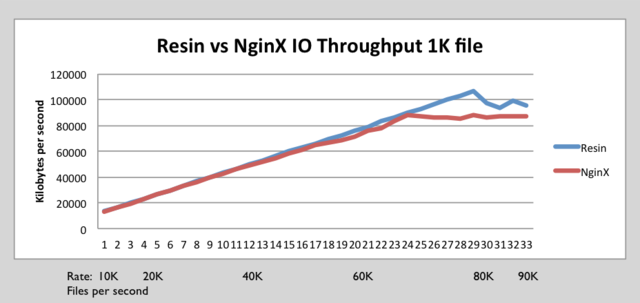
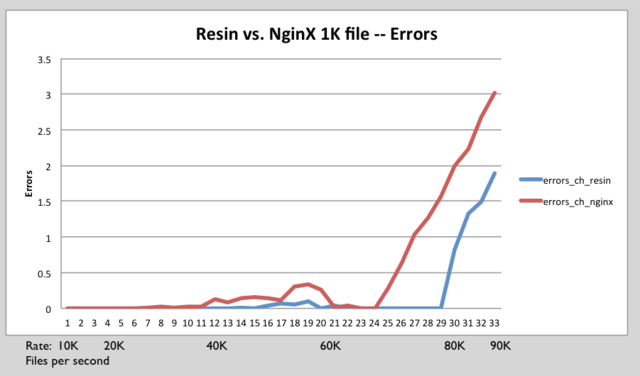
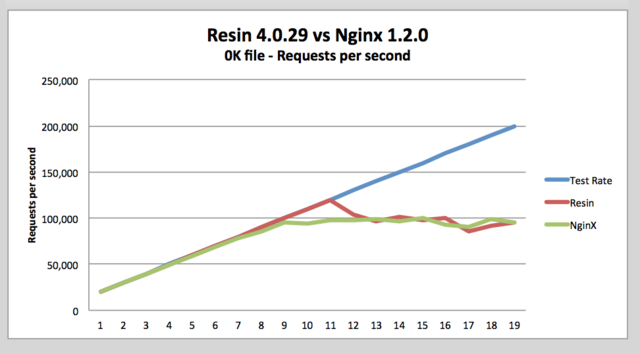
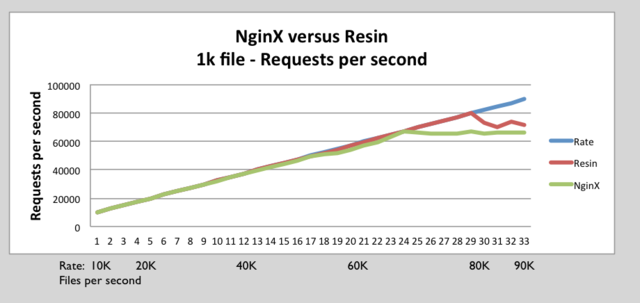
We have recently run some performance benchmarks comparing Resin 4.0.29 versus NginX 1.2.0. These benchmarks show that Resin Pro matches or exceeds NginX’s throughput.

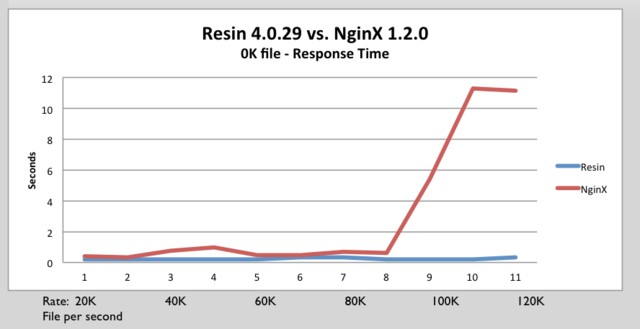
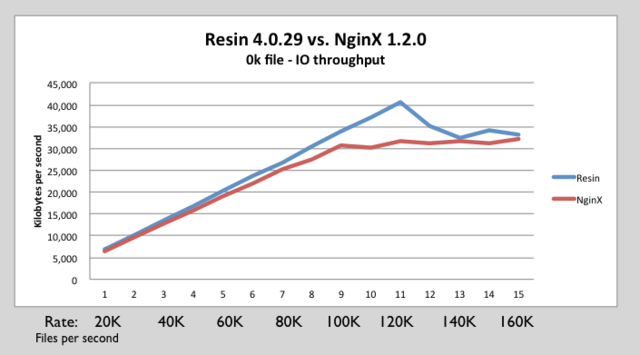
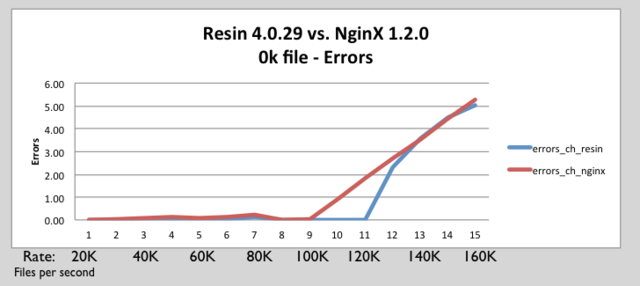
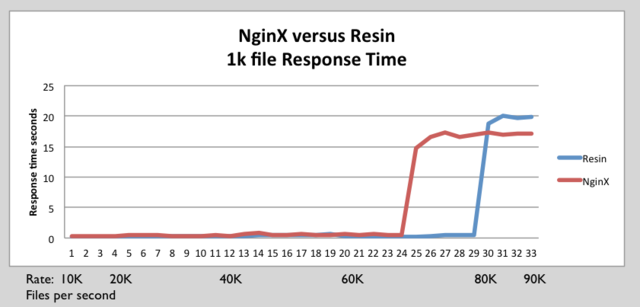
We tested 0k (empty HTML page), 1K, 8K and 64K byte files. At every level Resin matched or exceeded NginX performance.


Contents

Benchmark tools

The benchmark tests used the following tools:

  • httperf
  • AutoBench


httperf

httperf is tool produced by HP for measuring web server performance. The httperf tool supports HTTP/1.1 keepalives and SSL protocols.


AutoBench

Autobench is a tool for automating the process of performing a comparative benchmark test against two a web servers. Autobench uses httperf. Autobench runs httperf against each host. AutoBench increases the number of requests per seconds on each iteration. AutoBench delivers output in a format that can be easily consumed by spreadsheet tools. AutoBench has a mode where it can drive multiple clients against a set of servers to minimize the possibility of testing your client throughput instead of server throughput. The command autobenchd is used to run a daemon on client machines. The autobench_admincommand drives many clients to run test at same time by communicating with autobenchd.

Setup Overview
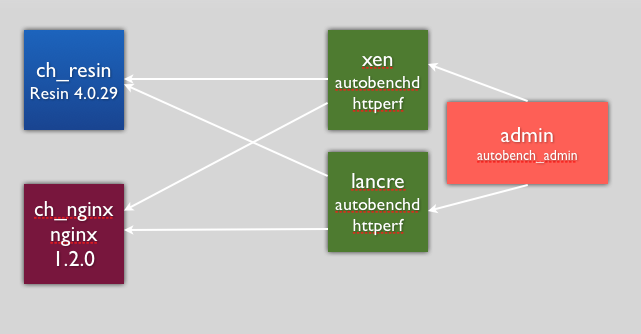
Setup benchmark diagram.png

Configuration

The only change that was made was the worker_processes were set to 8 for NginX to improve throughput.

Hardware Software Specifications

Client HW/OS specs:

  • i7 4 core / 8 HT, 2.8 GHZ, 8Meg Cache, 8 GB RAM.
  • Ubuntu 12 / Linux Kernel 3.2.0-26-generic

Server HW specs:

  • i7 4 core / 8 HT, 2.8 GHZ, 8Meg Cache, 8 GB RAM.
  • Ubuntu 12 / Linux Kernel 3.2.0-26-generic

Test software:

  • Autobench 2.1.1
  • httperf 0.9.0

Software under test:

  • Resin Pro 4.0.29
  • nginx 1.2.0

0k test

We want to make sure Resin can handle as many concurrent connections as possible without glitches or blocking. The tiny 0k file is a good test for high concurrency, because it spends less time on network overhead and more time stressing the threading and internal locks. Because we used an 8-core machine, we can be certain that we’re avoiding unnecessary locks or timing problems.

For most sites, the small file stress test simulates heavy ajax use, and small file use. As sites become more interactive, this small file test becomes ever more important.

As a comparison of a threaded Java web server with an event-based C web server, the 0k test is a good test of the threading and event manager dispatch. Because most of the time in the test is establishing a connection or switching between requests at the very highest rate, both the threading and the event management get a tough work-out.

Command Line Arguments

0k.sh

./admin.sh 300000 2000 20000 1000 0k

admin.sh

autobench_admin
--clients xen:4600,lancre:4600
--uri1 /file_$5.html
--host1 ch_resin --port1 8080
--uri2 /file_$5.html
--host2 ch_nginx --port2 80
--num_conn $1
--num_call 10
--low_rate $2
--high_rate $3
--rate_step $4
--timeout 3
--file out_con$1_start$2_end$3_step$4_$5.tsv

Above is used to setup 300,000 connections at a rate of 20,000 to 200,000 requests per second. Each iteration increases the rate by 10,000 from 20,000 to 200,000.

0k html file file_0k.html

 <html> 
 <body>
 <pre></pre>
 </body>
 </html>

0k full Results for 0K test
Resin nginx 0k full2.png

Resin nginx response time.png

Nginx resin 0k IO throughput.png

Nginx resin errors 0k.png


1K test

Command line

1k.sh

./admin.sh 200000 1000 10000 250 1k


admin.sh

autobench_admin
--clients xen.caucho.com:4600,lancre.caucho.com:4600 
--uri1 /file_$5.html
--host1 ch_resin --port1 8080
--uri2 /file_$5.html
--host2 ch_nginx --port2 80
--num_conn $1
--num_call 10
--low_rate $2
--high_rate $3
--rate_step $4
--timeout 3
--file out_con$1_start$2_end$3_step$4_$5.tsv


1k.html

<html>
<body>
<pre>
0 0123456789 0123456789 0123456789 0123456789 0123456789 0123456789 0123456789 0123456789 0123456789 
1 0123456789 0123456789 0123456789 0123456789 0123456789 0123456789 0123456789 0123456789 0123456789 
2 0123456789 0123456789 0123456789 0123456789 0123456789 0123456789 0123456789 0123456789 0123456789 
3 0123456789 0123456789 0123456789 0123456789 0123456789 0123456789 0123456789 0123456789 0123456789 
4 0123456789 0123456789 0123456789 0123456789 0123456789 0123456789 0123456789 0123456789 0123456789 
5 0123456789 0123456789 0123456789 0123456789 0123456789 0123456789 0123456789 0123456789 0123456789 
6 0123456789 0123456789 0123456789 0123456789 0123456789 0123456789 0123456789 0123456789 0123456789 
7 0123456789 0123456789 0123456789 0123456789 0123456789 0123456789 0123456789 0123456789 0123456789 
8 0123456789 0123456789 0123456789 0123456789 0123456789 0123456789 0123456789 0123456789 0123456789 
9 0123456789 0123456789 0123456789 0123456789 0123456789 0123456789 0123456789 0123456789 0123456789 
</pre>
</body> 
</html>

1k full Results for 1K test
Resin nginx 1k requests per second.png

Resin nginx 1k response time.png

Resin nginx IO 1k.png

Resin nginx 1k errors.png

64 K test results

Result

PUT IMAGES HERE

64k.sh

./admin.sh 10 50 1500 50 64k
====admin.sh====
<pre>
autobench_admin
--clients xen.caucho.com:4600,lancre.caucho.com:4600 
--uri1 /file_$5.html
--host1 ch_resin --port1 8080
--uri2 /file_$5.html
--host2 ch_nginx --port2 80
--num_conn $1
--num_call 10
--low_rate $2
--high_rate $3
--rate_step $4
--timeout 3
--file out_con$1_start$2_end$3_step$4_$5.tsv

64 test file

<html>
<body>
<pre>
0
0 0123456789 0123456789 0123456789 0123456789 0123456789 0123456789 0123456789 0123456789 0123456789
1 0123456789 0123456789 0123456789 0123456789 0123456789 0123456789 0123456789 0123456789 0123456789
2 0123456789 0123456789 0123456789 0123456789 0123456789 0123456789 0123456789 0123456789 0123456789
3 0123456789 0123456789 0123456789 0123456789 0123456789 0123456789 0123456789 0123456789 0123456789
4 0123456789 0123456789 0123456789 0123456789 0123456789 0123456789 0123456789 0123456789 0123456789
5 0123456789 0123456789 0123456789 0123456789 0123456789 0123456789 0123456789 0123456789 0123456789
6 0123456789 0123456789 0123456789 0123456789 0123456789 0123456789 0123456789 0123456789 0123456789
7 0123456789 0123456789 0123456789 0123456789 0123456789 0123456789 0123456789 0123456789 0123456789
8 0123456789 0123456789 0123456789 0123456789 0123456789 0123456789 0123456789 0123456789 0123456789
9 0123456789 0123456789 0123456789 0123456789 0123456789 0123456789 0123456789 0123456789 0123456789

[Repeats 63 more times, there are 0-7 blocks repeated 0-7 times]

</pre>
</body>
</html>

php 5.3.3 中的php-fpm配置

php 5.3.3 源码中开始包含 php-fpm,不用专门再打补丁了,只需要解开源码直接configure,关于php-fpm的编译参数有 –enable-fpm –with-fpm-user=www –with-fpm-group=www –with-libevent-dir=libevent位置。

这个php-fpm 不再支持 php-fpm 补丁具有的 /usr/local/php/sbin/php-fpm (start|stop|reload)等命令,需要使用信号控制:

master进程可以理解以下信号

SIGINT, SIGTERM 立刻终止
SIGQUIT 平滑终止
SIGUSR1 重新打开日志文件
SIGUSR2 平滑重载所有worker进程并重新载入配置和二进制模块

示例:
php-fpm 关闭:
kill -SIGINT `cat /usr/local/php/var/run/php-fpm.pid`
php-fpm 重启:
kill -SIGUSR2 `cat /usr/local/php/var/run/php-fpm.pid`

其次配置文件不再使用的xml 格式,改为了INI,但是配置参数几乎和以前一样,可参照xml格式的格式配置。

—————-补充内容—————-
php-fpm的启动:

cp -f (php -5.3.x-source-dir)/sapi/fpm/init.d.php-fpm /etc/init.d/php-fpm
chmod 755 /etc/init.d/php-fpm
/etc/init.d/php-fpm start
/sbin/chkconfig --add php-fpm (添加到开机服务列表)
/sbin/chkconfig php-fpm on

php-fpm的启动、停止和重启:
/etc/init.d/php-fpm start
/etc/init.d/php-fpm stop
/etc/init.d/php-fpm reload

Linux Maven的安装

1.首先到Maven官网下载安装文件,目前最新版本为3.0.3,下载文件为apache-maven-3.0.4-bin.tar.gz,下载可以使用wget命令;

2.进入下载文件夹,找到下载的文件,运行如下命令解压

tar -xvf apache-maven-3.0.4-bin.tar.gz

解压后的文件夹名为apache-maven-3.0.4

3.使用mv命令将apache-maven-3.0.4文件夹拷贝到自己指定的文件夹,比如/usr/local/下

mv -rf apache-maven-3.0.4 /usr/local/

4.配置环境变量,编辑/etc/profile文件,添加如下代码

MAVEN_HOME=/usr/local/apache-maven-3.0.4
export MAVEN_HOME
export PATH=${PATH}:${MAVEN_HOME}/bin

5.保存文件,并运行如下命令使环境变量生效

source /etc/profile

6.在控制台输入如下命令,如果能看到Maven相关版本信息,则说明Maven已经安装成功

mvn -v


resin 4.0.xx 版破解方法。

how to crack resin 4.0.2x resin 4.0.3x.

工具:jd http://java.decompiler.free.fr/

利用jd打开resin 4.0.xx目录下的lib/pro.jar

将源代码另存出来。再用eclipse打开com\caucho\license\ProLicenseStore.java

/* */ private int _professionalCount ;
/* */ private int _personalCount;

改为

/* */ private int _professionalCount =1000;
/* */ private int _personalCount = 1000;

重新编译成class文件,用winrar打开resin 4.0.xx目录下的lib/pro.jar,把生成的class文件拖进对应的目录即可。

仅供学习使用,请在下载后24时间内删除。