( ! ) Deprecated: Function WP_Dependencies-&gt;add_data() was called with an argument that is <strong>deprecated</strong> since version 6.9.0! IE conditional comments are ignored by all supported browsers. in /var/www/html/wp-includes/functions.php on line 6131
Call Stack
#TimeMemoryFunctionLocation
10.0000484048{main}( ).../index.php:0
20.0000484400require( '/var/www/html/wp-blog-header.php ).../index.php:17
30.10334103952require_once( '/var/www/html/wp-includes/template-loader.php ).../wp-blog-header.php:19
40.10394132944include( '/var/www/html/wp-content/themes/twentyfifteen/single.php ).../template-loader.php:125
50.10394132944get_header( $name = ???, $args = ??? ).../single.php:10
60.10394133160locate_template( $template_names = [0 => 'header.php'], $load = TRUE, $load_once = TRUE, $args = [] ).../general-template.php:48
70.10394133256load_template( $_template_file = '/var/www/html/wp-content/themes/twentyfifteen/header.php', $load_once = TRUE, $args = [] ).../template.php:749
80.10394133800require_once( '/var/www/html/wp-content/themes/twentyfifteen/header.php ).../template.php:814
90.10414141208wp_head( ).../header.php:18
100.10414141208do_action( $hook_name = 'wp_head' ).../general-template.php:3197
110.10414141424WP_Hook->do_action( $args = [0 => ''] ).../plugin.php:522
120.10414141424WP_Hook->apply_filters( $value = '', $args = [0 => ''] ).../class-wp-hook.php:365
130.10434144840wp_enqueue_scripts( '' ).../class-wp-hook.php:341
140.10434144840do_action( $hook_name = 'wp_enqueue_scripts' ).../script-loader.php:2311
150.10434145056WP_Hook->do_action( $args = [0 => ''] ).../plugin.php:522
160.10434145056WP_Hook->apply_filters( $value = '', $args = [0 => ''] ).../class-wp-hook.php:365
170.10444146944twentyfifteen_scripts( '' ).../class-wp-hook.php:341
180.10454148464wp_style_add_data( $handle = 'twentyfifteen-ie', $key = 'conditional', $value = 'lt IE 9' ).../functions.php:440
190.10454148464WP_Styles->add_data( $handle = 'twentyfifteen-ie', $key = 'conditional', $value = 'lt IE 9' ).../functions.wp-styles.php:245
200.10454148464WP_Dependencies->add_data( $handle = 'twentyfifteen-ie', $key = 'conditional', $value = 'lt IE 9' ).../class-wp-styles.php:385
210.10454148464_deprecated_argument( $function_name = 'WP_Dependencies->add_data()', $version = '6.9.0', $message = 'IE conditional comments are ignored by all supported browsers.' ).../class-wp-dependencies.php:317
220.10454148784wp_trigger_error( $function_name = '', $message = 'Function WP_Dependencies->add_data() was called with an argument that is <strong>deprecated</strong> since version 6.9.0! IE conditional comments are ignored by all supported browsers.', $error_level = 16384 ).../functions.php:5925
230.10464155168trigger_error( $message = 'Function WP_Dependencies-&gt;add_data() was called with an argument that is <strong>deprecated</strong> since version 6.9.0! IE conditional comments are ignored by all supported browsers.', $error_level = 16384 ).../functions.php:6131

( ! ) Deprecated: Function WP_Dependencies-&gt;add_data() was called with an argument that is <strong>deprecated</strong> since version 6.9.0! IE conditional comments are ignored by all supported browsers. in /var/www/html/wp-includes/functions.php on line 6131
Call Stack
#TimeMemoryFunctionLocation
10.0000484048{main}( ).../index.php:0
20.0000484400require( '/var/www/html/wp-blog-header.php ).../index.php:17
30.10334103952require_once( '/var/www/html/wp-includes/template-loader.php ).../wp-blog-header.php:19
40.10394132944include( '/var/www/html/wp-content/themes/twentyfifteen/single.php ).../template-loader.php:125
50.10394132944get_header( $name = ???, $args = ??? ).../single.php:10
60.10394133160locate_template( $template_names = [0 => 'header.php'], $load = TRUE, $load_once = TRUE, $args = [] ).../general-template.php:48
70.10394133256load_template( $_template_file = '/var/www/html/wp-content/themes/twentyfifteen/header.php', $load_once = TRUE, $args = [] ).../template.php:749
80.10394133800require_once( '/var/www/html/wp-content/themes/twentyfifteen/header.php ).../template.php:814
90.10414141208wp_head( ).../header.php:18
100.10414141208do_action( $hook_name = 'wp_head' ).../general-template.php:3197
110.10414141424WP_Hook->do_action( $args = [0 => ''] ).../plugin.php:522
120.10414141424WP_Hook->apply_filters( $value = '', $args = [0 => ''] ).../class-wp-hook.php:365
130.10434144840wp_enqueue_scripts( '' ).../class-wp-hook.php:341
140.10434144840do_action( $hook_name = 'wp_enqueue_scripts' ).../script-loader.php:2311
150.10434145056WP_Hook->do_action( $args = [0 => ''] ).../plugin.php:522
160.10434145056WP_Hook->apply_filters( $value = '', $args = [0 => ''] ).../class-wp-hook.php:365
170.10444146944twentyfifteen_scripts( '' ).../class-wp-hook.php:341
180.12944156272wp_style_add_data( $handle = 'twentyfifteen-ie7', $key = 'conditional', $value = 'lt IE 8' ).../functions.php:444
190.12944156272WP_Styles->add_data( $handle = 'twentyfifteen-ie7', $key = 'conditional', $value = 'lt IE 8' ).../functions.wp-styles.php:245
200.12944156272WP_Dependencies->add_data( $handle = 'twentyfifteen-ie7', $key = 'conditional', $value = 'lt IE 8' ).../class-wp-styles.php:385
210.12944156272_deprecated_argument( $function_name = 'WP_Dependencies->add_data()', $version = '6.9.0', $message = 'IE conditional comments are ignored by all supported browsers.' ).../class-wp-dependencies.php:317
220.12944156592wp_trigger_error( $function_name = '', $message = 'Function WP_Dependencies->add_data() was called with an argument that is <strong>deprecated</strong> since version 6.9.0! IE conditional comments are ignored by all supported browsers.', $error_level = 16384 ).../functions.php:5925
230.12954156816trigger_error( $message = 'Function WP_Dependencies-&gt;add_data() was called with an argument that is <strong>deprecated</strong> since version 6.9.0! IE conditional comments are ignored by all supported browsers.', $error_level = 16384 ).../functions.php:6131

Logic Empty Tag ()

empty tag – If the requested variable is either null or an empty string then we use this tag to evaluate the contents contained in the nested body parts of this tag.


Tag evaluation of the nested body content occurs only if the specified value is either absent (i.e. null), an empty string (i.e. a java.lang.String with a length of zero), or an empty java.util.Collection or java.util.Map (tested by the isEmpty() method on the respective interface).


Attributes of Empty Tag


Attribute Name Description
name

This attribute specifies a  JSP bean variable which is required to make comparison. 

property

The variable contains the property of the bean which is required to make comparison and is specified by the name attribute. 

scope

This specifies the bean scope within which  the bean is searched  by the name property, or “any scope” if not specified.


Logic notEmpty Tag (<logic:notEmpty>…</logic:notEmpty>) 


notEmptyIf the requested variable is neither null nor an empty string then we use this tag to evaluate the contents contained in the nested body parts of this tag.


Tag evaluation of the nested body content occurs only if the specified value is available (i.e.not null) and is not an empty string (i.e. a java.lang.String with a length of zero).

Attributes of notEmpty Tag


Attribute Name Description
name

This attribute specifies a  JSP bean variable which is required to make comparison.  

property

The variable contains the property of the bean which is required to make comparison and is specified by the name attribute. 

scope

This specifies the bean scope within which  the bean is searched  by the name property, or “any scope” if not specified.


Example Illustrating the use of the Empty<logic:empty> and the notEmpty <logic:notEmpty> logic tags.


Here you will learn to use the Struts  Logic tags. We will cover an example that will show  a comparison between  the two logic tags (ie..<logic:empty> and the <logic:notEmpty>).


Example code


Creating an Action  Class


Develop a simple action class EmptyAction.java.


package roseindia.net;

import java.io.*;
import java.util.*;

/**

* @author Amit Gupta
* @Web http://www.roseindia.net
* @Email [email protected]

**/
import javax.servlet.http.HttpServletRequest;
import javax.servlet.http.HttpServletResponse;
import javax.servlet.ServletException;
import org.apache.struts.action.*;

public class EmptyAction extends Action 
{
  public ActionForward execute(ActionMapping mapping,
    ActionForm form,
    HttpServletRequest request,
    HttpServletResponse response)
    throws IOException, ServletException {


        return mapping.findForward(“success”);
    }
}


Creating Form Bean


Our form bean class contains only one property text. Here is the code of FormBean (EmptyForm.java)


package roseindia.net;

import org.apache.struts.action.*;

/**

* @author Amit Gupta
* @Web http://www.roseindia.net
* @Email [email protected]

**/

import javax.servlet.http.HttpServletRequest;
import javax.servlet.http.HttpServletResponse;

public class EmptyForm extends ActionForm 
{
    
    private String text = “”;
       
  public String getText() 
    {
        return text;
    }
    
    public void setText(String text
    {
    this.text=text;
  }


}


Defining form Bean in struts-config.xml file


Add the following entry in the struts-config.xml file for defining the form bean


<form-bean name=”EmptyForm” type=”roseindia.net.EmptyForm”/>

 Developing the Action Mapping in the struts-config.xml

Here, Action mapping helps to select the method from the Action class for specific requests.


<action path=”/EmptyAction”
type=”roseindia.net.EmptyAction”
name=”EmptyForm”
scope=”request”
input=”/pages/input.jsp”>
<forward name=”success” path=”/pages/output.jsp”/>
</action>

Developing the input.jsp page


<%@ taglib uri=”/tags/struts-html” prefix=”html” %>
<%@ taglib uri=”/tags/struts-logic” prefix=”logic” %>

<html:html>
<head>
<title>Using &lt;logic&gt; Tags</title>
</head>

<body>
<h1>Using &lt;logic&gt; Tags</h1>

<html:form action=”/EmptyAction” method =”post”>

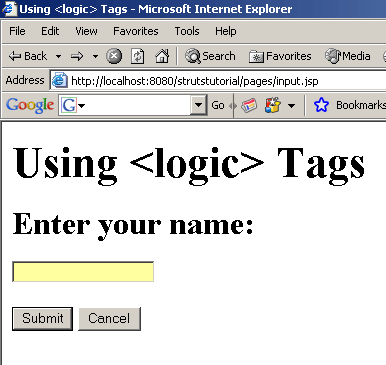
<h2>Enter your name:</h2>
<html:text property=”text”/>

<br>
<br>

<html:submit value=”Submit”/>


<html:cancel/>
</html:form>
</body>
</html:html>


Developing the output.jsp page


<%@ taglib uri=”/tags/struts-bean” prefix=”bean” %>
<%@ taglib uri=”/tags/struts-logic” prefix=”logic” %>

<HTML>
<HEAD>
<TITLE>Here’s Your Data…</TITLE>
</HEAD>

<BODY>
<H3>Here’s Your Data…</H3>

<h4>The text field text:</h4>

<bean:write name=”EmptyForm” property=”text”/>

<logic:notEmpty name=”EmptyForm” property=”text” scope=”request”>
<h4>Using the tag &lt;logic:notEmpty &gt; </h4> 
Results:not Empty
</logic:notEmpty>


<logic:empty name=”EmptyForm” property=”text” scope=”request”>
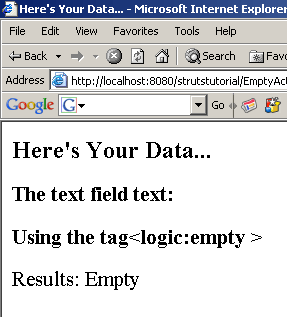
<h4>Using the tag&lt;logic:empty &gt;</h4> 
Results: Empty
</logic:empty>


</BODY>
</HTML>

Add the following line in the index.jsp to call the form.


<li>
<html:link page=”/pages/input.jsp”>Struts File Upload</html:link>
<br>
Example demonstrates  how EmptyAction Class works.
</li>


Building and Testing the Example 


To build and deploy the application go to Struts\Strutstutorial directory and type ant on the command prompt. This will deploy the application. Open the browser and navigate to the input.jsp page. Your browser displays the following  page.


Writing nothing to the out.jsp page displays the working of  the  Empty Logic tag <logic:empty > 


 Writing nothing displays the following out.jsp page


Now  write any data to the input.jsp to see the working of  the notEmpty logic tag <logic:notEmpty >


The <logic:notEmpty > evaluated here displays the output.jsp as


Leave a Reply

Your email address will not be published. Required fields are marked *

This site uses Akismet to reduce spam. Learn how your comment data is processed.