( ! ) Deprecated: Function WP_Dependencies-&gt;add_data() was called with an argument that is <strong>deprecated</strong> since version 6.9.0! IE conditional comments are ignored by all supported browsers. in /var/www/html/wp-includes/functions.php on line 6131
Call Stack
#TimeMemoryFunctionLocation
10.0000484072{main}( ).../index.php:0
20.0000484424require( '/var/www/html/wp-blog-header.php ).../index.php:17
30.10394111152require_once( '/var/www/html/wp-includes/template-loader.php ).../wp-blog-header.php:19
40.10444140256include( '/var/www/html/wp-content/themes/twentyfifteen/archive.php ).../template-loader.php:125
50.10444140256get_header( $name = ???, $args = ??? ).../archive.php:19
60.10444140472locate_template( $template_names = [0 => 'header.php'], $load = TRUE, $load_once = TRUE, $args = [] ).../general-template.php:48
70.10444140568load_template( $_template_file = '/var/www/html/wp-content/themes/twentyfifteen/header.php', $load_once = TRUE, $args = [] ).../template.php:749
80.10444141112require_once( '/var/www/html/wp-content/themes/twentyfifteen/header.php ).../template.php:814
90.10454148520wp_head( ).../header.php:18
100.10454148520do_action( $hook_name = 'wp_head' ).../general-template.php:3197
110.10454148736WP_Hook->do_action( $args = [0 => ''] ).../plugin.php:522
120.10454148736WP_Hook->apply_filters( $value = '', $args = [0 => ''] ).../class-wp-hook.php:365
130.10474152152wp_enqueue_scripts( '' ).../class-wp-hook.php:341
140.10474152152do_action( $hook_name = 'wp_enqueue_scripts' ).../script-loader.php:2311
150.10474152368WP_Hook->do_action( $args = [0 => ''] ).../plugin.php:522
160.10474152368WP_Hook->apply_filters( $value = '', $args = [0 => ''] ).../class-wp-hook.php:365
170.10494278672twentyfifteen_scripts( '' ).../class-wp-hook.php:341
180.10504280192wp_style_add_data( $handle = 'twentyfifteen-ie', $key = 'conditional', $value = 'lt IE 9' ).../functions.php:440
190.10504280192WP_Styles->add_data( $handle = 'twentyfifteen-ie', $key = 'conditional', $value = 'lt IE 9' ).../functions.wp-styles.php:245
200.10504280192WP_Dependencies->add_data( $handle = 'twentyfifteen-ie', $key = 'conditional', $value = 'lt IE 9' ).../class-wp-styles.php:385
210.10504280192_deprecated_argument( $function_name = 'WP_Dependencies->add_data()', $version = '6.9.0', $message = 'IE conditional comments are ignored by all supported browsers.' ).../class-wp-dependencies.php:317
220.10504280512wp_trigger_error( $function_name = '', $message = 'Function WP_Dependencies->add_data() was called with an argument that is <strong>deprecated</strong> since version 6.9.0! IE conditional comments are ignored by all supported browsers.', $error_level = 16384 ).../functions.php:5925
230.10514281264trigger_error( $message = 'Function WP_Dependencies-&gt;add_data() was called with an argument that is <strong>deprecated</strong> since version 6.9.0! IE conditional comments are ignored by all supported browsers.', $error_level = 16384 ).../functions.php:6131

( ! ) Deprecated: Function WP_Dependencies-&gt;add_data() was called with an argument that is <strong>deprecated</strong> since version 6.9.0! IE conditional comments are ignored by all supported browsers. in /var/www/html/wp-includes/functions.php on line 6131
Call Stack
#TimeMemoryFunctionLocation
10.0000484072{main}( ).../index.php:0
20.0000484424require( '/var/www/html/wp-blog-header.php ).../index.php:17
30.10394111152require_once( '/var/www/html/wp-includes/template-loader.php ).../wp-blog-header.php:19
40.10444140256include( '/var/www/html/wp-content/themes/twentyfifteen/archive.php ).../template-loader.php:125
50.10444140256get_header( $name = ???, $args = ??? ).../archive.php:19
60.10444140472locate_template( $template_names = [0 => 'header.php'], $load = TRUE, $load_once = TRUE, $args = [] ).../general-template.php:48
70.10444140568load_template( $_template_file = '/var/www/html/wp-content/themes/twentyfifteen/header.php', $load_once = TRUE, $args = [] ).../template.php:749
80.10444141112require_once( '/var/www/html/wp-content/themes/twentyfifteen/header.php ).../template.php:814
90.10454148520wp_head( ).../header.php:18
100.10454148520do_action( $hook_name = 'wp_head' ).../general-template.php:3197
110.10454148736WP_Hook->do_action( $args = [0 => ''] ).../plugin.php:522
120.10454148736WP_Hook->apply_filters( $value = '', $args = [0 => ''] ).../class-wp-hook.php:365
130.10474152152wp_enqueue_scripts( '' ).../class-wp-hook.php:341
140.10474152152do_action( $hook_name = 'wp_enqueue_scripts' ).../script-loader.php:2311
150.10474152368WP_Hook->do_action( $args = [0 => ''] ).../plugin.php:522
160.10474152368WP_Hook->apply_filters( $value = '', $args = [0 => ''] ).../class-wp-hook.php:365
170.10494278672twentyfifteen_scripts( '' ).../class-wp-hook.php:341
180.12974282368wp_style_add_data( $handle = 'twentyfifteen-ie7', $key = 'conditional', $value = 'lt IE 8' ).../functions.php:444
190.12974282368WP_Styles->add_data( $handle = 'twentyfifteen-ie7', $key = 'conditional', $value = 'lt IE 8' ).../functions.wp-styles.php:245
200.12974282368WP_Dependencies->add_data( $handle = 'twentyfifteen-ie7', $key = 'conditional', $value = 'lt IE 8' ).../class-wp-styles.php:385
210.12974282368_deprecated_argument( $function_name = 'WP_Dependencies->add_data()', $version = '6.9.0', $message = 'IE conditional comments are ignored by all supported browsers.' ).../class-wp-dependencies.php:317
220.12974282688wp_trigger_error( $function_name = '', $message = 'Function WP_Dependencies->add_data() was called with an argument that is <strong>deprecated</strong> since version 6.9.0! IE conditional comments are ignored by all supported browsers.', $error_level = 16384 ).../functions.php:5925
230.12984282912trigger_error( $message = 'Function WP_Dependencies-&gt;add_data() was called with an argument that is <strong>deprecated</strong> since version 6.9.0! IE conditional comments are ignored by all supported browsers.', $error_level = 16384 ).../functions.php:6131

我的第一個STM32程式,使用Arduino IDE 介面

rduino已經用了很長的一段時間,有些與 Arduino 相容開發板的延伸應用,如 NodeMCU、ESP32 等,實作了一些相關的控制。當時覺得 STM32 可能與 Arduino 類似,就沒特別想買一個來練習。這次在看了 STM32 的規格後,覺得比 Arduino 強很多,也可以使用 Arduino IDE 來撰寫 STM32 程式,利用購買一批電子零件的機會,順便買了一片 STM32F103C8T6 開發板,來測試一下這片開發板的功能。
我整理一下 Arduino Uno 的 ATmega328 與 Mega 使用的 ATmega2560 以及 STM32 三個微控制器的比較,可以看到 STM32 的 32bit 處理器及其他規格都比 Arduino Uno 或 Mega 要強很多。一般如果是用在做玩具或啟蒙電子教育功能,Arduino 比較適合,如果是要做成工業或商用產品,那 STM32 會更好。

編號 規格 STM32F103C8 ATMEGA328 ATMEGA2560
1 CPU 32 Bit 8 Bit 8 Bit
2 CPU clock [MHz] 72 16 16
3 Flash [KB] 64 / 128 32 256
4 RAM [KB] 20 2 8
5 ADC Channels 10 8 16
6 ADC Resolution [bits] 12 10 10
7 ADC Sampling Frequency [KHz] 1000 10 / 15.38 max 15
8 PWM Channels 20 6 15
9 SPI 2 2 5
10 I2C 2 1 1
11 USB 1 0 0
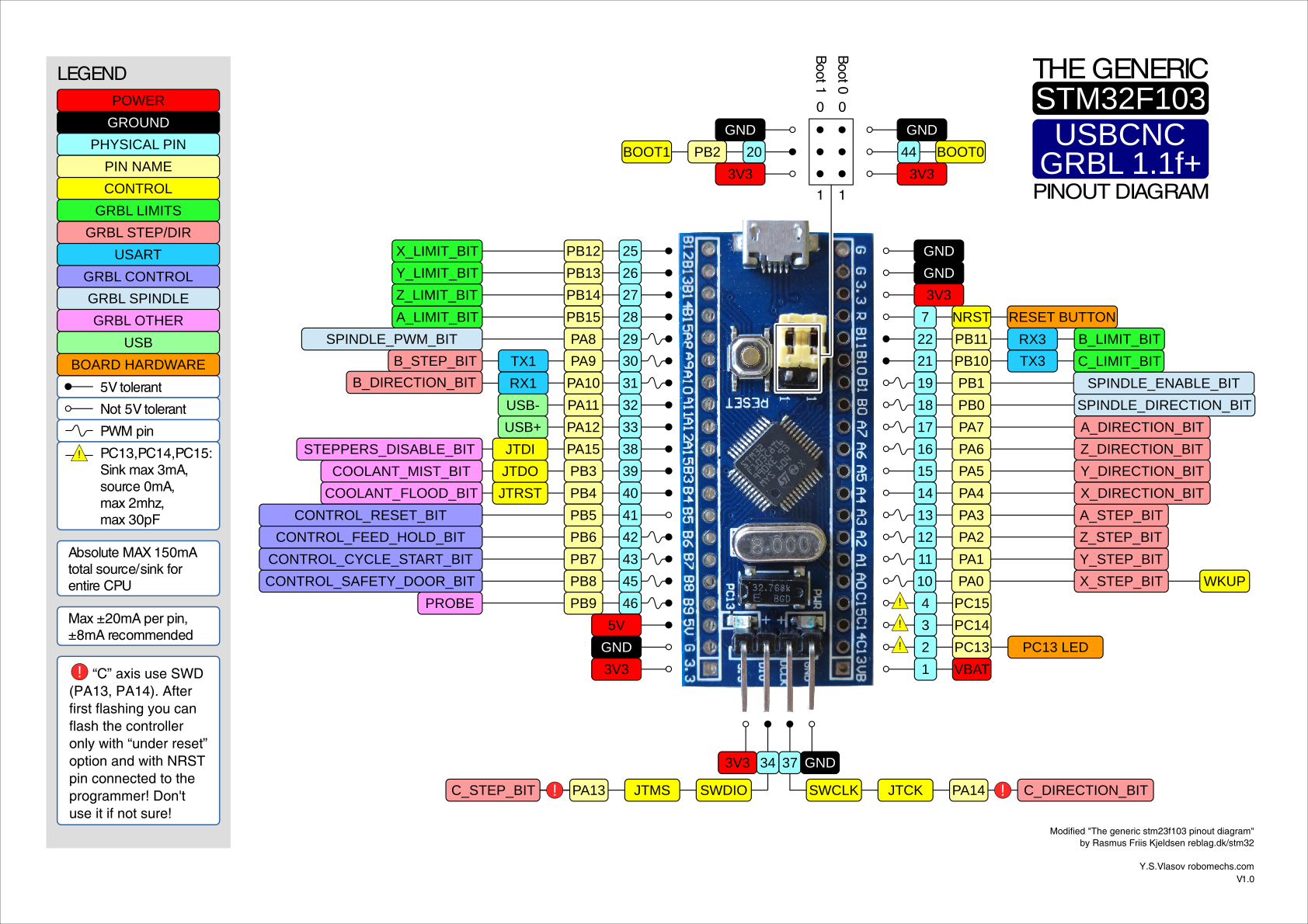
這是 STM32 的引腳排列資料:

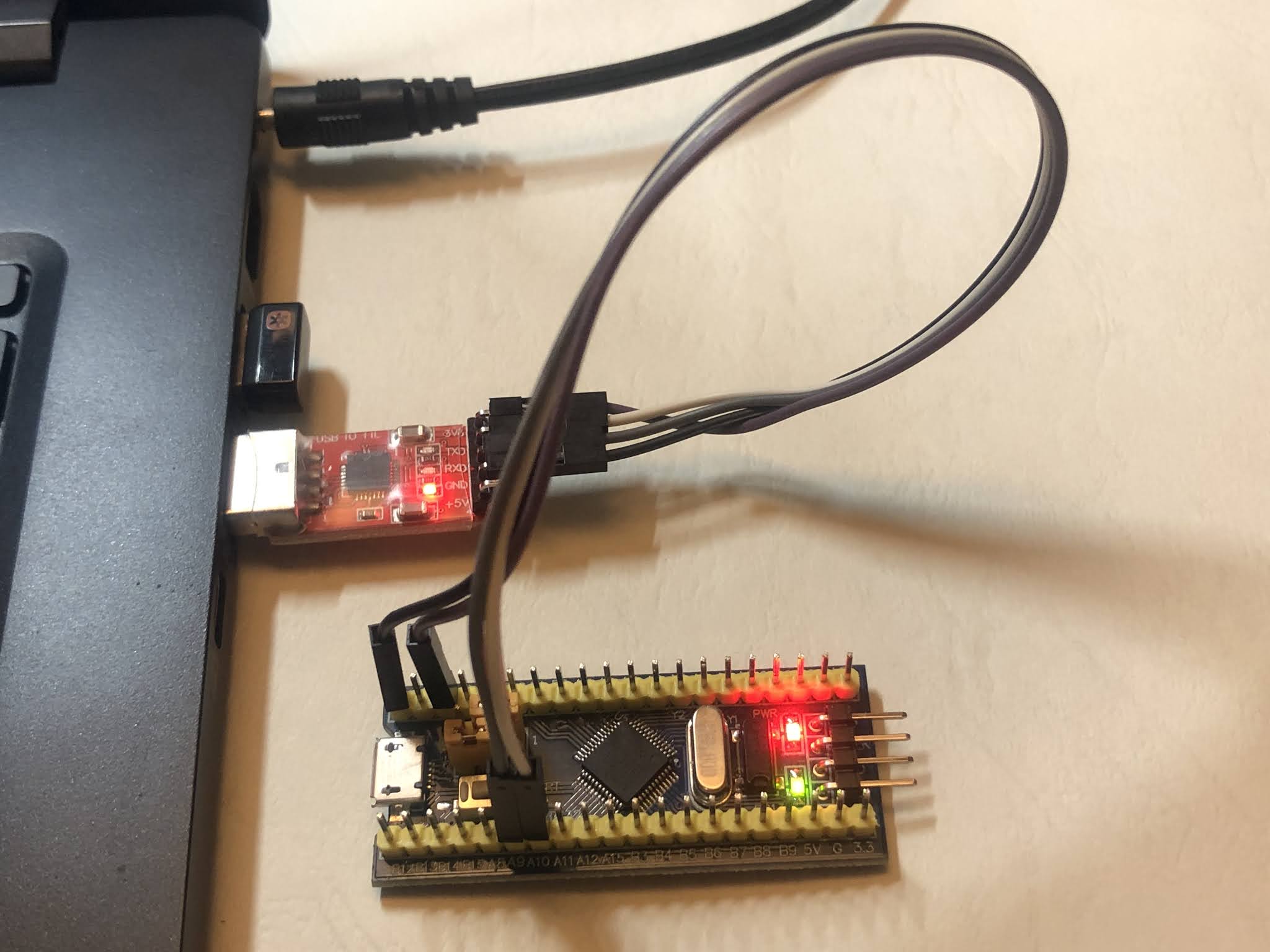
剛開始使用 STM32 時,我以為連接的方式會跟 Arduino 一樣,直接拉一條 USB 線連接電腦跟STM32,看一下裝置管理員,無法正常安裝驅動程式,Google一下網路上的方法,是要用 TTL轉 USB 來連接電腦,於是拿出先前購買來設定 ESP01 的 CP2102,找了網路的說明,試著上傳第一個 LED 燈閃爍程式,試了幾次錯誤後,終於成功了。以下就記錄一下實際安裝的過程。

[材料]

  • USB轉TTL序列傳輸線 CP2102
  • STM32F103C8T6開發板
  • 排線 x4 條

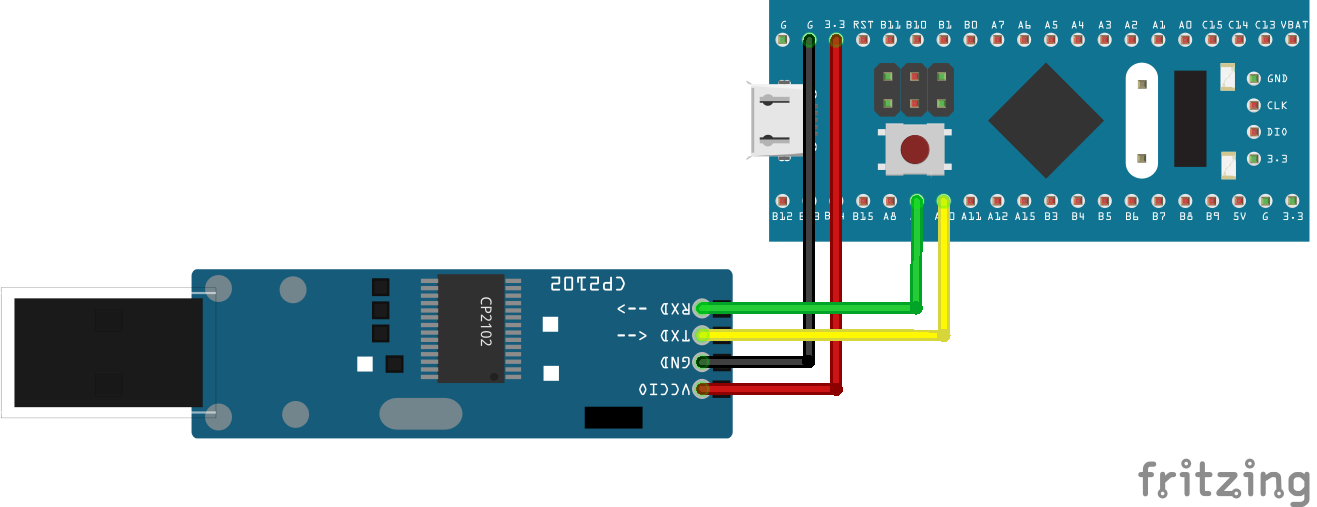
[接線圖]

CP2102 STM32F103C8T6
GND GND
3V3 3.3V
RX PA9
TX PA10

[安裝STM32程式庫及設定]

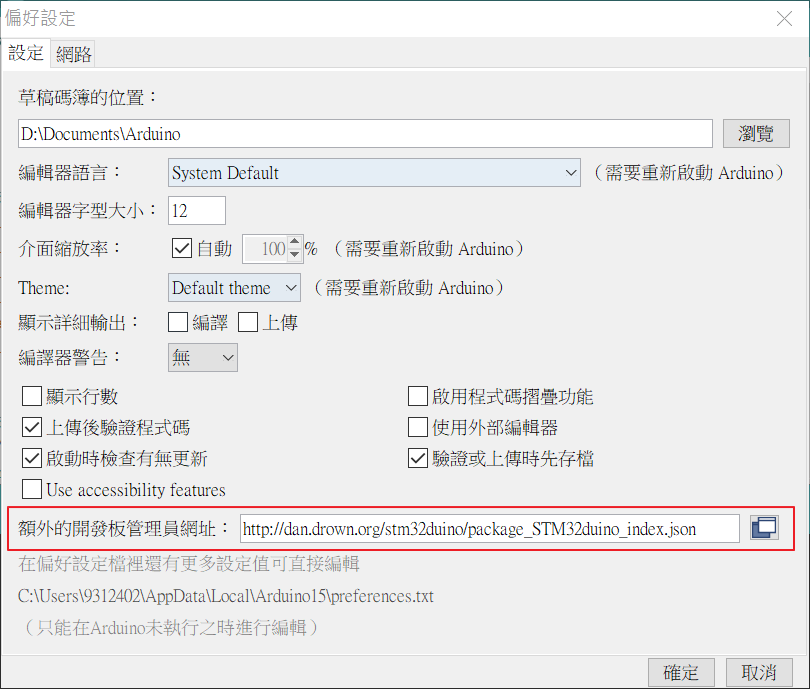
要在Arduino IDE撰寫STM32程式,需要安裝STM32程式庫,這個設定方法跟ESP8266很像。開啟Arduino IDE,選擇 [檔案 File] → [偏好設定 Preferences ],在 [額外的開板管理員網址:] 輸入以下網址:

http://dan.drown.org/stm32duino/package_STM32duino_index.json

如下圖:
接著在Arduino IDE畫面選擇 [工具 Tools] → [開發板 Board] → [開發板管理員 Boards manager…],在搜尋的地方輸入「STM32」,如以下畫面:
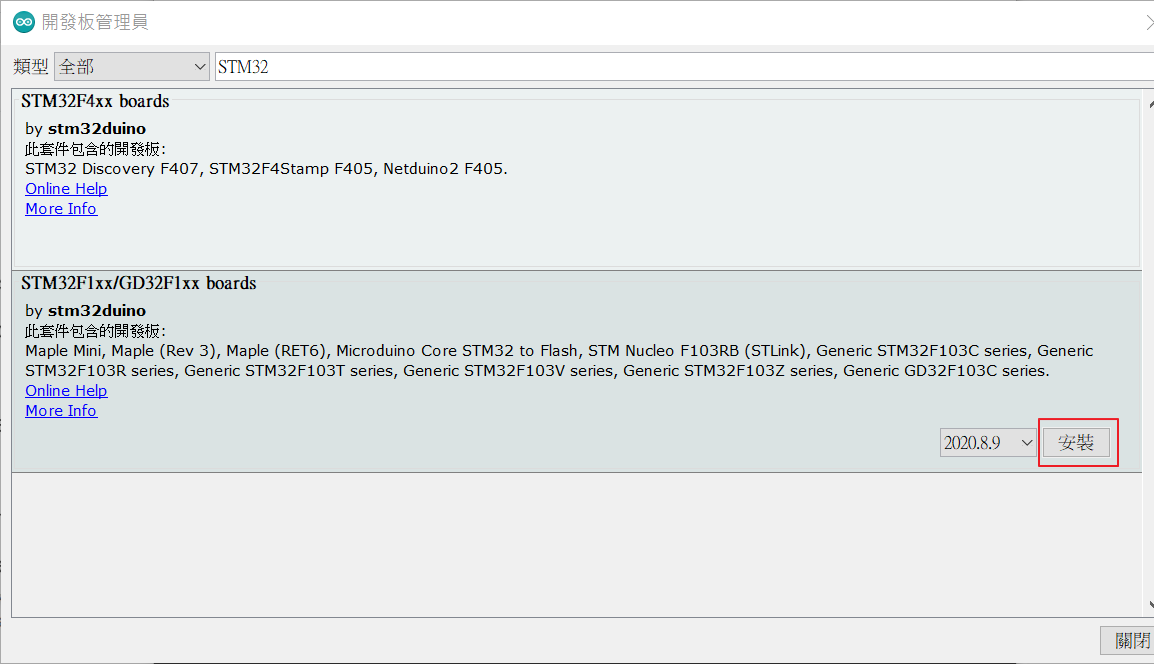
在STM32F1xx/GD32F1xx Boards選項右下方按 [安裝 Install]進行程式庫安裝。
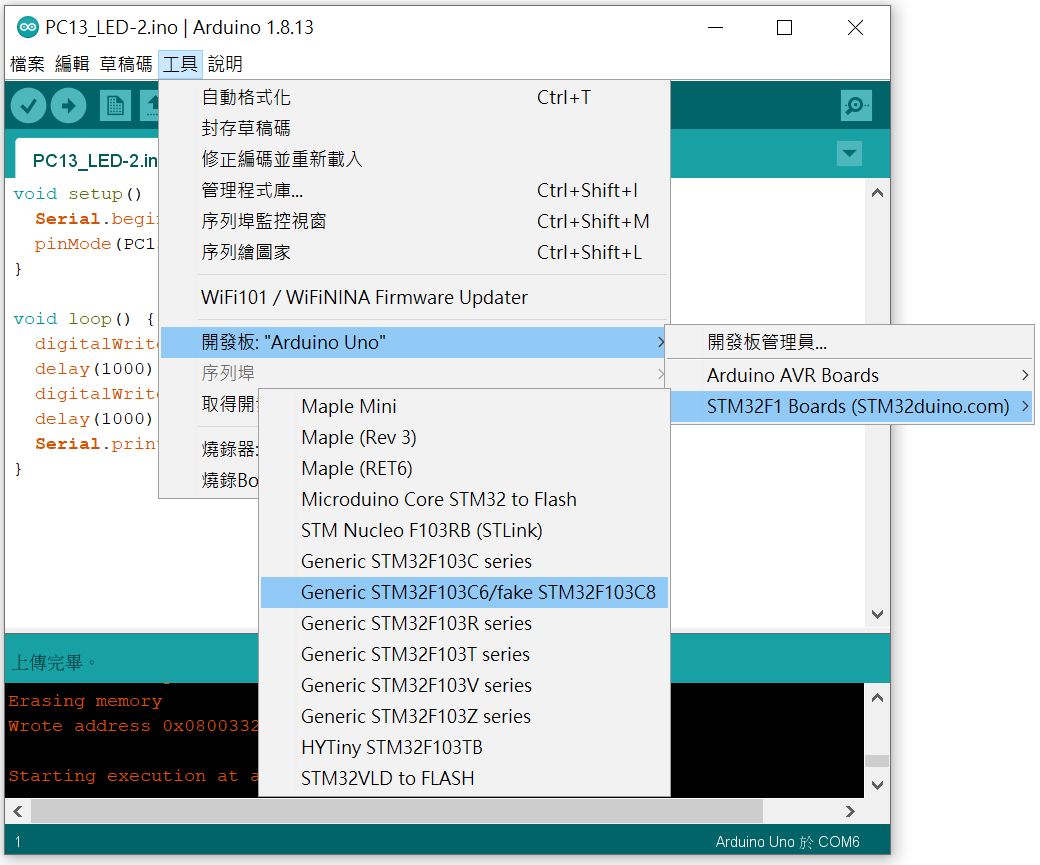
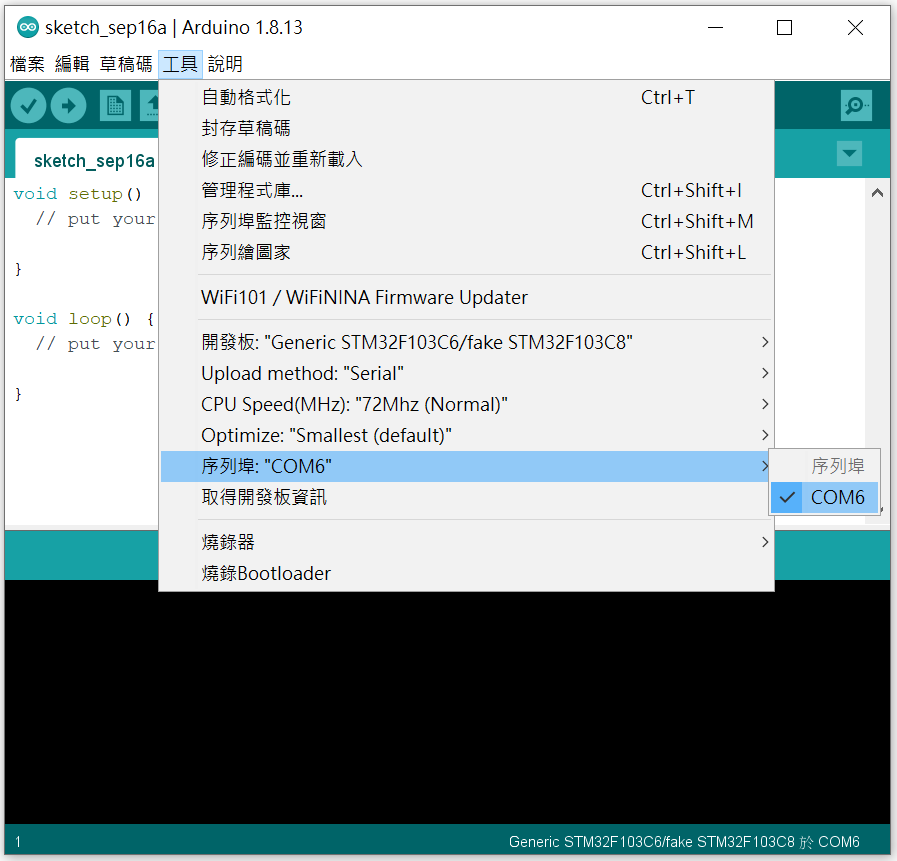
完成後,回到主畫面設定開發板:選擇 [工具 Tools] → [開發板 Board] → [STM32F1 Board(STM32duino)] → [Generic STM32F103C6 / fake STM32F103C8] 。

接著設定 CP2102 連線埠,可以先看一下裝置管理員的驅動程式是否正常,並取得連線埠資訊,如下圖紅框處:
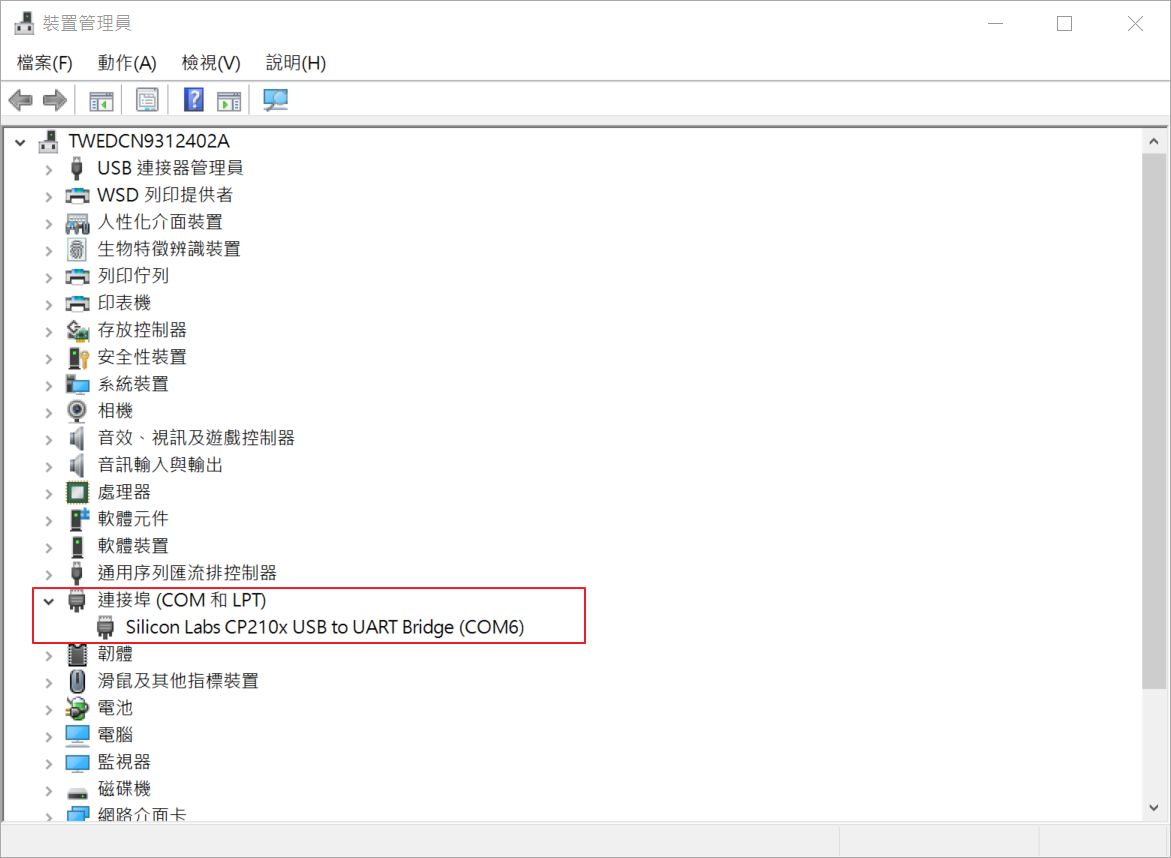
回到 Arduino IDE 設定:選擇 [工具 Tools] → [Upload method:”Serial”] → [Serial]。
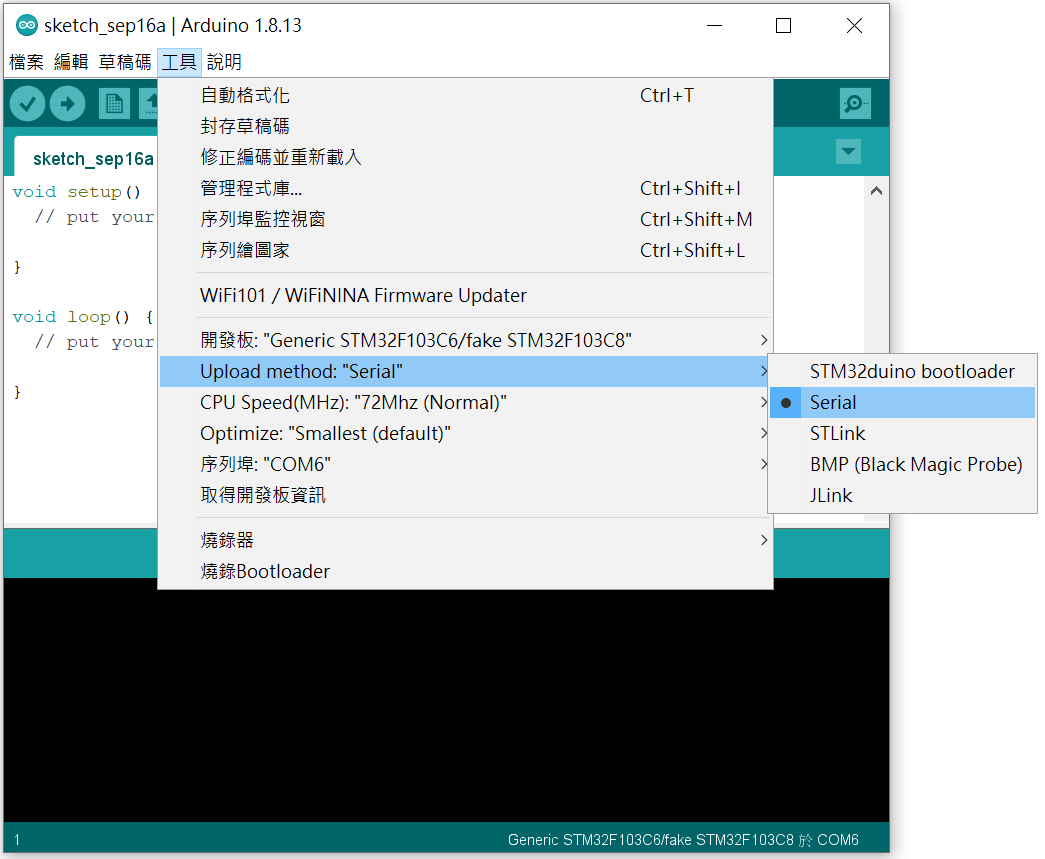
繼續設定連接序列埠:選擇 [工具 Tools] → [序列埠: Port] → [COM6]。這裡的COM6,依每台電腦不同的連線埠而更改。

設定完成後,還有個地方要調整,就是主板上有兩個Jump,其中一個 Boot0 要調整 Jump 設定為DFU模式,從預設的0位置,改到1。如下圖紅框處。而 BOOT Jump 設定具有不同的模式,等之後比較熟悉 STM32 後,再另外解釋其功能。
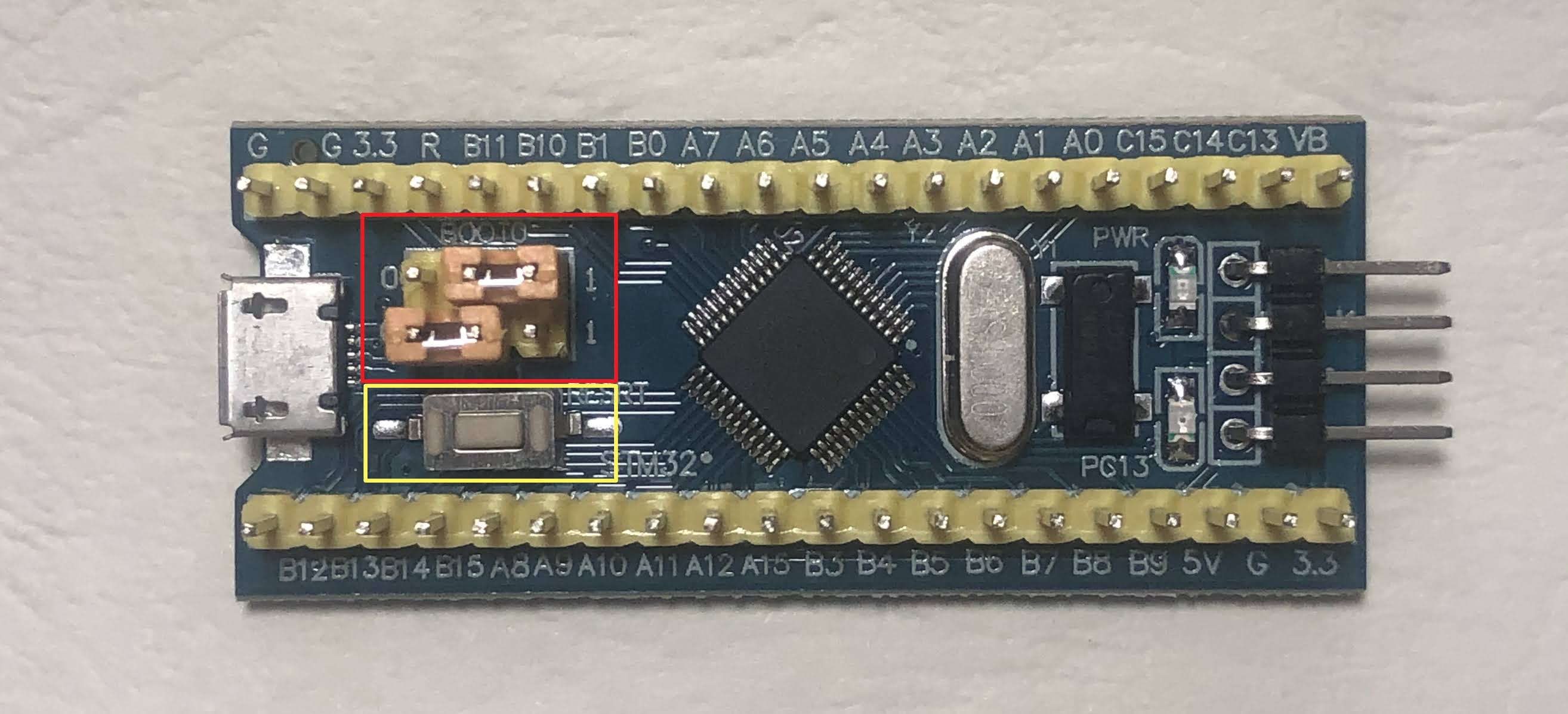
我要上傳程式時,發現會卡在這個地方時,只要重新按上圖黃色框處的白色 RESRT按鍵,重新起動,即可順利上傳。
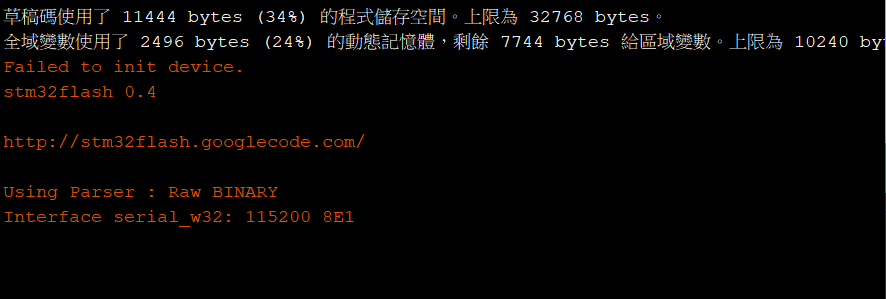
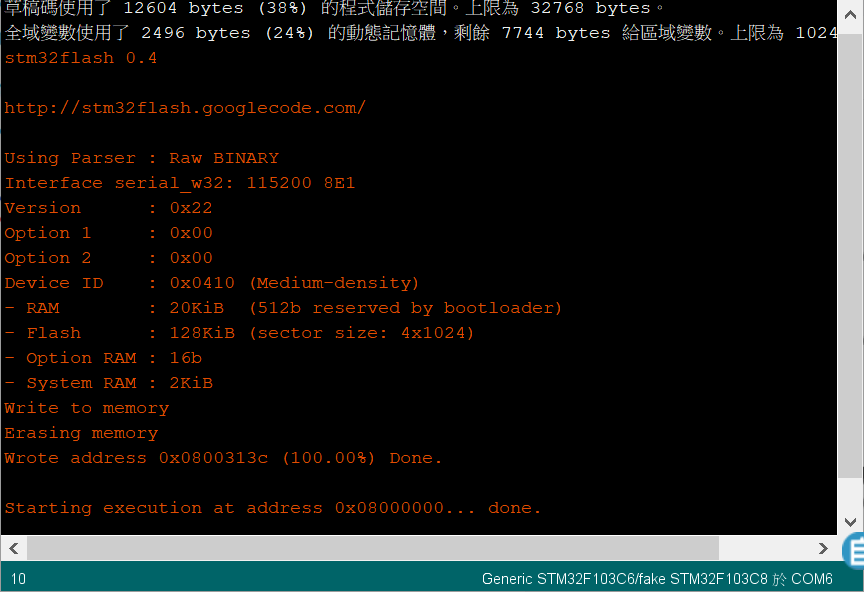
上傳程式成功的畫面如下:
[程式]

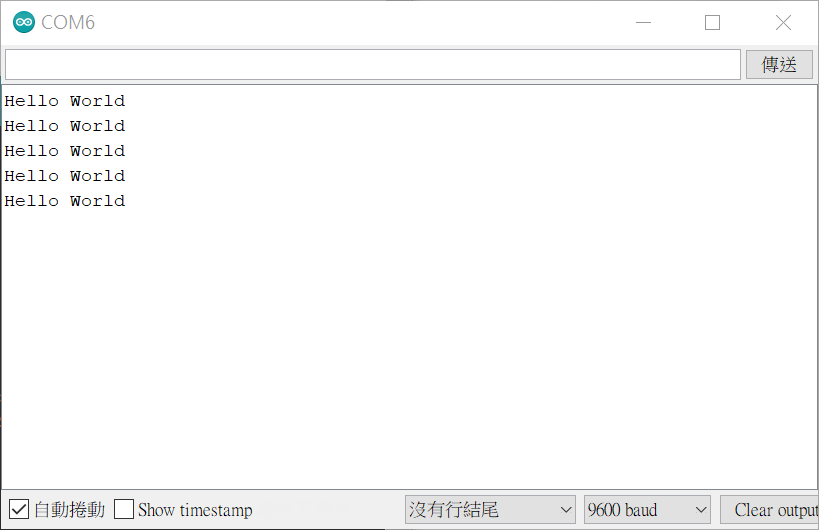
這個程式會讓LED燈每秒閃爍一次,串列埠視窗會印出”Hello World”。

#define pinLED PC13

void setup() {
  Serial.begin(9600);
  pinMode(pinLED, OUTPUT);
}

void loop() {
  digitalWrite(pinLED, HIGH);
  delay(1000);
  digitalWrite(pinLED, LOW);
  delay(1000);
  Serial.println("Hello World");  
}

[實作結果]

執行的影片如下:

開啟串列埠的視窗: